 Neody
Storage that works for you
Tiered chests, bulk barrels, upgrades that sort and smelt, backpacks, racks, inventory sorting, a Controller and storage terminal: the Neody Legacy storage guide.
Contents
A prosperous Kingdom has well-stocked granaries. Storage on Neody Legacy is a system of its own: containers upgrade without being emptied, enhancements sort, smelt and compact for you, and backpacks organise mining supplies while you dig. This guide covers upgradeable storage with chests, barrels, shulker boxes and backpacks, the unified storage console, sorting and search through inventory interaction tools, display racks from the rack network and their kitchen and transport companions.
- Type
- Storage and logistics
- Difficulty
- Beginner to expert
- Key resource
- A lever, really
- Unlocked
- From your first plank
- Main synergy
- Machinery and colonies
Your first chests: the lever changes everything
Upgradeable chests, barrels and shulker boxes are separate blocks from their ordinary counterparts. Their characteristic recipe uses a lever in the centre , available in your first hour, well before redstone.
- Chest : 8 planks of the same wood around a lever.
- Barrel : planks at the sides, a slab at the top and bottom centre, and a central lever.
- Limited Barrel : planks and 1 to 4 slabs depending on model I to IV, with a central lever. These specialise in bulk storage, covered below.
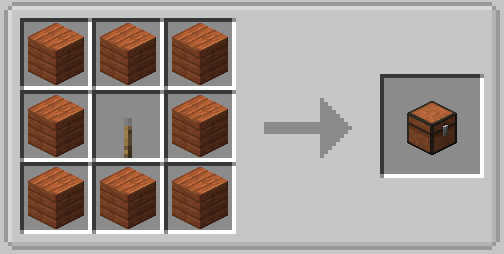
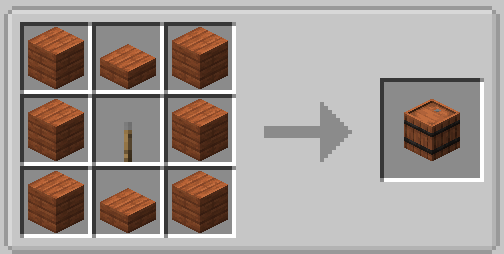
Throughout this guide, exact recipes are available in the recipe browser: hover over the item and press R. There is no need to memorise crafting grids.
Six tiers without moving house
Table costs are upgrades from the previous tier. Direct upgrades from wood have their own recipes; the screenshots below show those direct variants.
Apply a tier upgrade directly to the blockwith a right-click, without breaking it or disturbing its contents. Your chest can progress from wood to netherite in the same place.
| Tier | Slots: chest, barrel, shulker box | Upgrade slots | Upgrade from previous tier |
|---|---|---|---|
| Wood | 27 | 1 | Starting tier |
| Copper | 45 | 1 | 8 copper ingots and lever |
| Iron | 54 | 2 | 4 iron ingots and lever |
| Gold | 81 | 3 | 8 gold ingots and lever |
| Diamond | 108 | 4 | 8 diamonds and lever |
| Netherite | 132 | 5 | 1 netherite ingot and lever, shapeless |
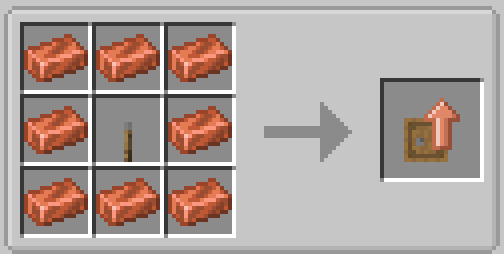
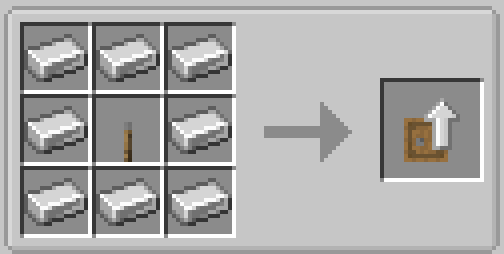
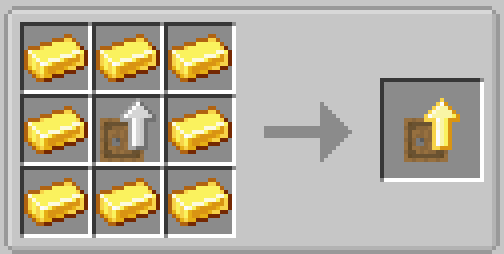
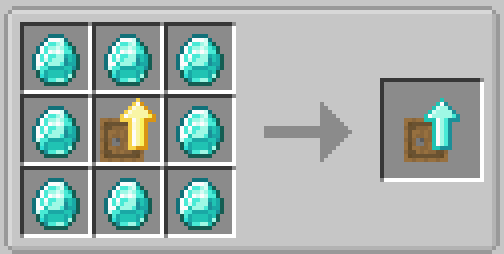
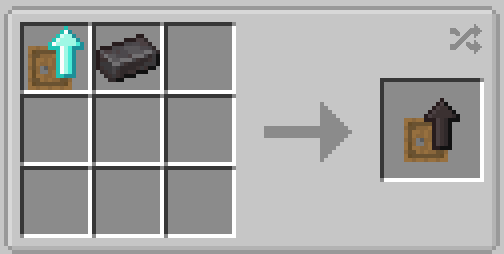
You can also convert an ordinary shulker box directly into upgradeable storage while keeping its contents. It follows the same tiers, but shulker boxes still cannot contain other shulker boxes.
Limited Barrels: the Kingdom's granaries
A Limited Barrel , model I to IV, trades variety for volume. It has 1 to 4 display sections, each locked to one item type, with capacity per section increasing greatly by tier. Use it for wheat from your farm, quarry cobblestone or foundry ingots.
| Model | Wood | Copper | Iron | Gold | Diamond | Netherite |
|---|---|---|---|---|---|---|
| I (1 section) | 32× | 53× | 64× | 96× | 128× | 160× |
| II (2 sections) | 16× | 27× | 32× | 48× | 64× | 80× |
| III (3 sections) | 10× | 17× | 20× | 30× | 40× | 50× |
| IV (4 sections) | 8× | 13× | 16× | 24× | 32× | 40× |
Read the table as stacks per section. A netherite Limited Barrel I holds 160 stacks of one item in its sole section. Tiers increase depth rather than adding slots.
Upgrades: put your chest to work
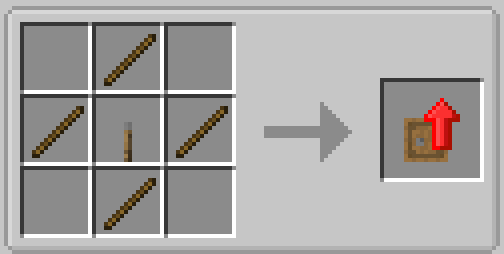
Each container has 1 to 5 upgrade slots depending on tier. Most enhancements begin with an Upgrade Base : 4 iron ingots and 5 planks in a checkerboard pattern.
This is different from theBasic Tier Upgrade used to convert existing chests and barrels, which uses four sticks and a lever.
Upgrade families
- Pickup : Pickup Upgrade (base, sticky piston, 2 planks and 3 redstone): collects items touching the container. Magnet Upgrade is built on a Pickup Upgrade with 2 Ender Pearls, 3 iron ingots, redstone and lapis, attracting nearby items. Useful below harvesting points.
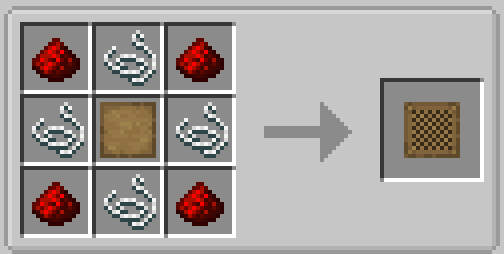
- Filtering : base, 4 redstone and 4 string give 9 filter slots, or 16 in the advanced version, using an allowlist or blocklist. Combine it with magnets or voiding for precise sorting.
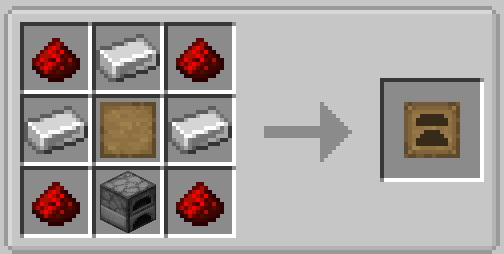
- Smelting : base, furnace, 3 iron and 4 redstone put a furnace inside the chest. Blast furnace and smoker variants exist, along with automatic smelting versions that draw items and fuel from the container. Kingdom limit: 1 cooking upgrade per container.
- Compacting : base, 4 pistons, 2 iron and 2 redstone automatically turn 9 ingots into a block or 9 nuggets into an ingot. The Compression Upgrade compresses and decompresses items automatically.
- Crafting : base, crafting table, 2 iron and 1 chest add a persistent 3×3 crafting grid inside the container. Your recipes stay in place.
- Voiding : base, 3 obsidian, Ender Pearl and 2 redstone destroy surplus or filtered items, particularly excess cobblestone.
- Feeding : base, golden carrot, golden apple, glistering melon and pearl automatically feed nearby players. Try one in your colony's common room.
- Jukebox : base, jukebox, 2 iron and redstone add music. Limit 1 per container.
- Hopper : base, hopper, 2 iron and 3 redstone pull items from and push items to adjacent blocks, with settings for each face.
- Stack : the main capacity family, covered below.
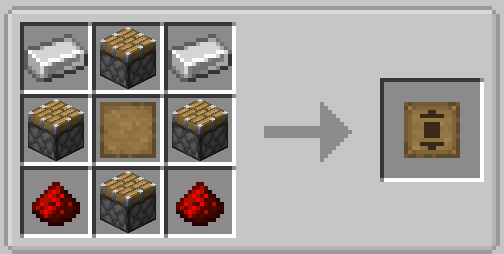
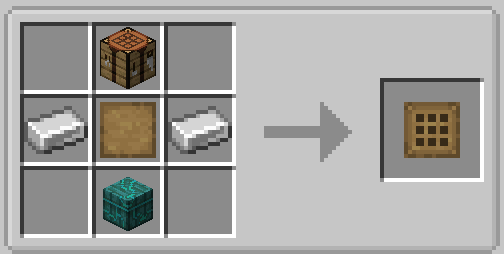
Stack Upgrades: multiplying capacity
Each Stack Upgrade multiplies the stack size in every container slot: ×2 at Level 1, using 8 logs around a base, then ×3, ×4 with iron, ×8 with gold, ×16 with diamond and ×32 with netherite. The Kingdom allows 2 Stack Upgrades per chest, barrel or shulker box : two level 5 upgrades give ×1024 stacks, turning one netherite chest into a storeroom. There are also downgrades (÷8, ÷16, ÷32) for fine control of machinery.
The network: Controller, links and access points
Once your storeroom has more than ten containers, the Contrôleur de stockage (Storage Controller) makes organisation easier. Any upgradeable container physically touching the Controller or an already connected block joins the network within 15 blocks. Deposit into the Controller and each item goes to a container already holding that kind.
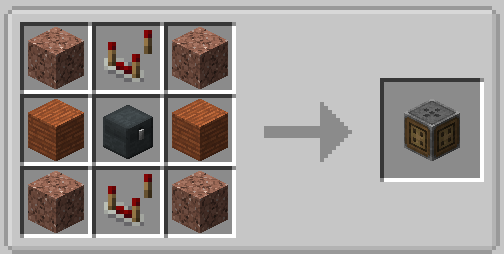
- Lien de stockage (Storage Link) : pearl, plank, repeater and stone in a 2×2 grid. Connects an isolated container without direct contact, within range.
- E/S de stockage (Storage I/O) and Input/Output variants provide automation access for your belts and Mechanical Arms to deposit or extract items.
- Outil de stockage (Storage Tool) : pearl, iron, redstone torch and 2 sticks. Manages and checks the network.
The storage console: one screen for everything
The console network provides searchable access. Place an Inventory Connector against ordinary or upgradeable containers, then cables or an Inventory Trim to extend connections, and a Console de stockage (Storage Terminal) to list everything with search. A Console de fabrication (Crafting Terminal) adds a crafting grid supplied by the network.
Use it as a counter: upgradeable storage handles tiers, enhancements and routing, while the console lets you browse on returning from expeditions. Exact terminal recipes are available withR in the recipe browser.
Inventory tools: sorting and searching containers
Inventory interaction tools add buttons to many container screens without placing or crafting anything. They provide an alternative to the older inventory sortingtools. Available controls depend on the screen and your settings.
- Search finds items in the open container.
- Sort container inventory and Sort player inventory sort the container or your inventory.
- Transfer to container inventory and Transfer to player inventory are transfer controls on supported screens. See the controls available in game.
Search and sorting buttons are hidden on very small containers and deliberately excluded from some special screens. If they are absent, the screen may not support them.
Backpacks: your mobile base
Upgradeable backpacks bring chest features onto your back, from leather with 27 slots to netherite with120 slots and 7 upgrade slots. They allow even more Stack Upgrades than chests, up to 3 Stack Upgrades per bag.
- Quick opening : press
Bwhile wearing a bag or hovering over one in your inventory. Wear it in the chest slot or back slot of your accessories. - Placeable : crouch and right-click to set it down as an automatable container; repeat with an empty hand to pick it up.
- Deposit Upgrade : hold the bag, crouch and right-click a chest to deposit all filtered contents. Restock Upgrade does the reverse, refilling the bag from a chest. Refill Upgrade keeps key items such as arrows, bread and torches supplied in your inventory from the bag.
- Inception Upgrade allows bags inside the bag, with their upgrades still active: a moving convoy in one backpack.
- Module indestructible (Everlasting Upgrade) makes the bag indestructible against explosions, lava and the void. Combine it with the grave : the bag survives, while the grave holds the rest.
- Tools include portable anvils and smithing tables, fluid tanks and an XP pump with automatic Mending.
Moving safely: Packing Tape
Breaking a full upgradeable container drops its contents. If that would produce more than 200 item entities, the Kingdom blocks breaking it and shows a message. Repeated crouched attempts can override this protection, but that is almost never a sensible way to move it.
Use Ruban d'emballage (Packing Tape) made from a slimeball and paper. Right-click the container to pick it up packed with its contents and upgrades, then place it elsewhere. Super Ruban d'emballage (Super Packing Tape) also exists.
Storage companions: racks, kitchens and transport
- Display racks offer more than shelves. A Controller in stone, iron, gold, diamond, emerald or netherite connects racks that touch it or another rack directly, with corners to turn around walls. Racks come in several materials and woods; better Controllers support more racks, as shown in the tooltip. Use one Controller per network. Two options unlock by hand: Insertion with 1 hopper in your inventory, and Tri (Sorting) with 1 redstone block. Racks display their contents, ideal for workshops or the tavern.
- Kitchen storage provides cupboards and containers matching the cooking furniture , giving storage a tavern kitchen style.
- Moving storage puts upgradeable containers on moving entities, such as a boat chest travelling with your fleet.
- Machinery integration allows chests and backpacks to work on wagons and moving assemblies, preserving tiers and upgrades in your rolling base.
- Converting other wooden chests The additional chests of the Kingdom convert directly into upgradeable chests, covering every wood variety.
Common problems and troubleshooting
| Symptom | Cause | Solution |
|---|---|---|
| Cannot break a chest; a message appears | Protection against more than 200 dropped items | Use Packing Tape |
| Upgrade will not fit | Limit reached: 2 Stack / 1 cooking / 1 Jukebox | Remove a conflicting upgrade or use two containers |
| Controller ignores a chest | Broken contact chain or outside the 15-block range | Fill the gap, move the chest closer or use a Storage Link |
| No sorting or search button | Screen too small or deliberately excluded | Use the Controller, storage console or your inventory sorting |
| Rack will not connect | No contact with a Controller or rack, or Controller capacity reached | Restore contact or upgrade the Controller's material |
| Cannot put a shulker box inside another | Game rule | Use an Inception Upgrade in a backpack instead |
| Magnet collects neighbours' dropped items | No filter configured | Filter the Magnet Upgrade to collect only your items |
Quick FAQ
- How do I enlarge a chest without emptying it? Right-click with a tier upgrade.
- Maximum slots? 132 at netherite tier, before stack multiplication, up to ×1024 with the two allowed level 5 upgrades.
- How do I put everything away in one click? Deposit into the Controller for automatic routing; after mining, use the bag's Deposit Upgrade on a buffer chest.
- A furnace inside a chest? Yes: a Smelting Upgrade, maximum 1 per container, including automatic variants.
- Can someone search my bag? By default, no. Other players cannot open it, but lock it in settings for certainty.
- Console or Controller? Both: Controller for routing and console for finding things.
- Where is the older chest sorting feature? Disabled: inventory interaction tools provide search, sorting and transfer.
- What happens if I die with my bag? A grave holds your items where you died. Any player can break it and take them, so return promptly. A bag with an Everlasting Upgrade cannot be destroyed.
- Where are all the recipes? In the recipe browser :
R= recipe,U= uses.
On Neody Legacy in practice
- Death and graves : on death, the grave system places your items in a grave where you fell. Find it promptly: anyone can break it and take its contents, especially in busy areas. An Obituary lists the place, dimension, date and items. An Everlasting Upgrade protects the bag itself; otherwise, return quickly, particularly after dying somewhere dangerous.
- Your personal storeroom does not replace your colony's Warehouse : citizens use their own racks and Warehouse. Keep colony logistics separate from personal treasure.
- A question, problem or missing chest? Visit the Kingdom's Discord: the staff can trace container interactions.
Your storage roadmap
① Day 1: wood chests made with levers and conversion of ordinary chests
② First mine: copper or iron tier and a backpack with Pickup Upgrade
③ Established base: Limited Barrels for bulk goods, filters and automatic smelting
④ Storeroom: Controller, I/O and storage console, or display racks
⑤ Late game: netherite tiers, two ×32 Stack Upgrades and an Everlasting backpack
Organise today, rule tomorrow: a well-stocked Kingdom is already rich.