Neody
Linking your Discord to your Minecraft account
Link Discord and Minecraft in 5 steps: /link, a token valid for 10 minutes, in-game confirmation and common errors. Unlock Royal Orders beyond the trial.

Contents
Linking your Discord to your Minecraft account takes a few minutes and follows five steps: a message in game, a command on Discord and confirmation in game. In return, you unlock Royal Orders beyond the trial allowance, receive your verified player role and synchronise your profile with the Kingdom's Discord server. Follow this guide step by step, with explanations of the messages you will see and solutions to common errors.
- Time
- A few minutes
- You need
- To be connected in game and a member of the Kingdom's Discord
- Commands
/linkin game,/link code:…on Discord,/link confirm …in game- Token validity
- 10 minutes
- Limit
- One Discord account = one Minecraft player
Why link your Discord?
Royal Orders create money: every fulfilled order brings deniers into the Kingdom. For that money to retain its value, each account must correspond to a real player. Otherwise, someone could create a dozen accounts and drain the Kingdom's treasury.
Discord provides a simple, free way to establish your player identity. Three rules apply automatically:
One Discord account = one player
A Discord account unlocks only one Minecraft account.
An eligible Discord account
If the account is too new, check the date shown in game for full access.
2 full accesses per internet connection
A single internet connection can unlock only two full accesses over the last 30 days.
For privacy, your connection address is never stored in readable form: only an unreadable fingerprint is used to count accesses.
Before you start
- A free Discord account and the app or website discord.com.
- The Neody Legacy launcher and your Minecraft account connected to the server: the in-game command
/linkis only available to connected players. - A little time: both tokens in the process are each valid for 10 minutes . Have Discord open beside the game.
Linking in 5 steps
1. Join the Kingdom's Discord
Click the official invitation: https://discord.gg/5PJr7nmcFA. You must be a member of the server : the command is entered in the Kingdom's Discord server, and your role cannot be assigned elsewhere.
2. Type /link in game
In Minecraft chat, type /link. The game displays a message headed “ Neody Legacy • Liaison Discord ” (Discord linking), with a green [Copier le jeton] (Copy token)button. Click it to copy your token to the clipboard. The message tells you to use /link code:<jeton> on Discord and warns that the token expires in 10 minutes. The token is neither a link nor a short code to copy by hand: the button copies it for you.
3. Type /link code: on Discord
In the Kingdom's server, type /link, choose the code option and paste your token. Submit it. Only you can see the reply: “Compte Minecraft lié” (Minecraft account linked), followed by your username , your colony if detected, and “Rôle Discord attribué” (Discord role assigned).
4. Copy the confirmation command
You are not finished yet: to check that you own the Minecraft account, the bot gives you a command in a code block in this form: /link confirm <jeton>. Copy the entire command.
5. Return to the game and paste the command
Paste it into Minecraft chat and submit it. You will see “Compte Discord confirmé. Synchronisation en cours…” (Discord account confirmed; synchronisation in progress), then “Profil RP synchronisé avec Discord” (Roleplay profile synchronised with Discord). If you have not created your character yet, a message instead says that the link will apply automatically to your future roleplay identity. Finally, “Rôle Discord vérifié” (Discord role verified) confirms you are done.
/link for you and closes the screen to show chat: all you need to do is click [Copier le jeton].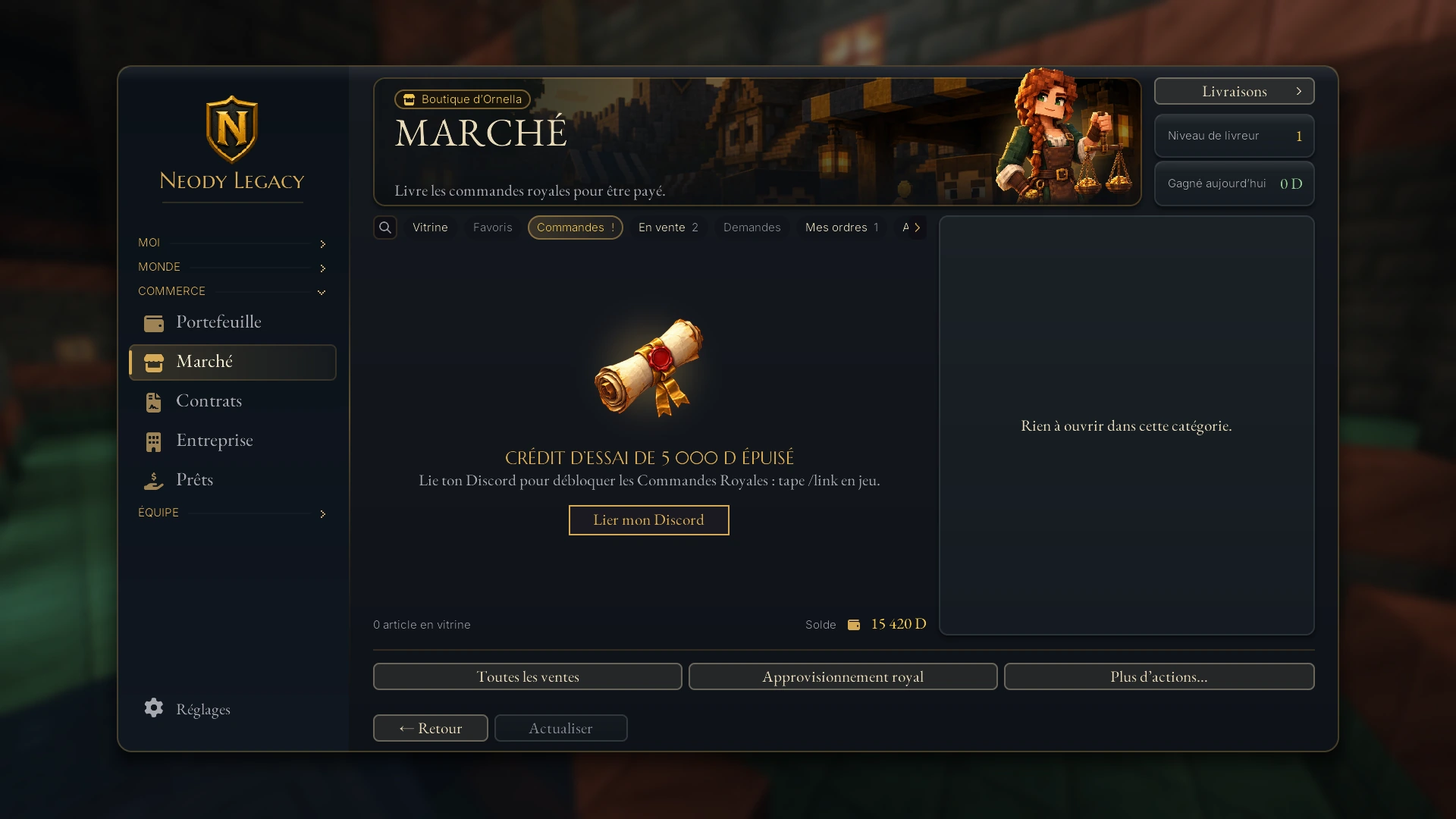
Checking that it worked
- In game : type
/link(or/link status, which does the same thing). If everything is correct, you will see “ Neody Legacy • Discord lié ” (Discord linked), with “Compte confirmé” (Account confirmed) and a [Resynchroniser] (Resynchronise) button. - On Discord : type
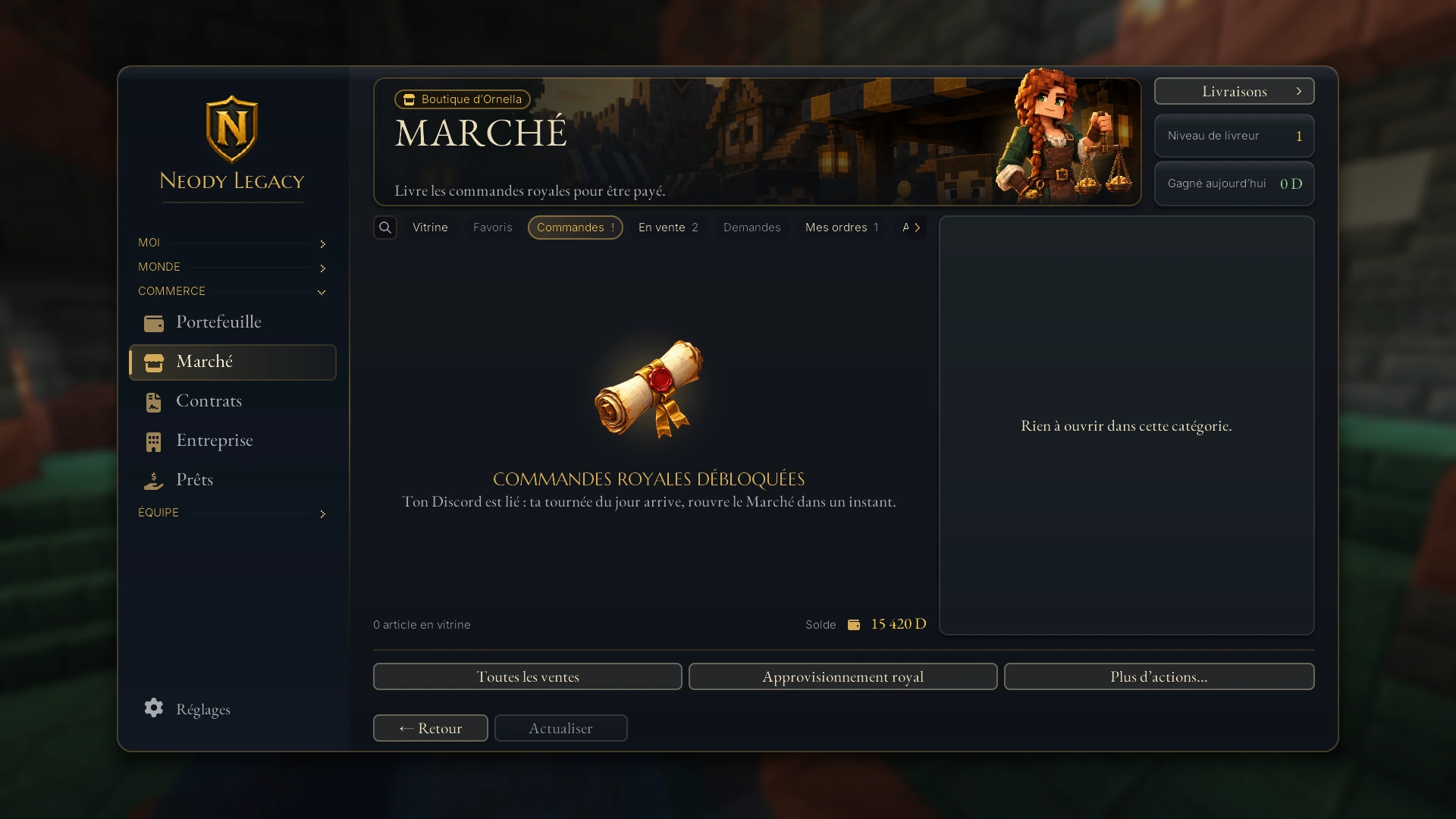
/linkwith no option to see your linked profile. If nothing is linked, you will see “Aucun compte lié” (No account linked) and a Lier mon compte (Link my account)button. - In the Market : “Commandes Royales débloquées. Ton Discord est lié : ta tournée du jour arrive, rouvre le Marché dans un instant” confirms that Royal Orders are unlocked and asks you to reopen the Market shortly for today's round.
- On your character profile : the Discord line changes from “Discord non lié” (Discord not linked) to “Discord lié” (Discord linked).
Resynchronising, changing accounts and unlinking
Resynchronise
Your role is missing or your profile seems out of date? Type /link in game and click [Resynchroniser] (Resynchronise). On Discord, running /link again without an option also checks your role. If you see “Le rôle Discord n'a pas pu être vérifié automatiquement” (The Discord role could not be verified automatically), simply run the command again to retry.
Unlink your account
Changing your Minecraft or Discord account? First, you must unlink, with a two-way process that mirrors linking:
1. On Discord
Type /link action:unlink. The link is removed on Discord, your player role is taken away, and the bot gives you a command: /link unlink <jeton> to run in game.
2. In game
Paste the command into chat. You will see “Compte Discord dissocié côté Minecraft. Retrait du rôle en cours…” (Discord account unlinked in Minecraft; role removal in progress), then “Rôle Discord retiré” (Discord role removed). If you see “Rôle Discord à retirer manuellement” (Discord role must be removed manually), tell the staff on Discord.
Common errors and solutions
| Message | Cause | Solution |
|---|---|---|
| Jeton de liaison invalide. Relance /link en jeu. (Invalid linking token; run the command again in game.) | The token was copied incorrectly or changed. | Start again and use [Copier le jeton], without typing the token by hand. |
| Ce jeton a expiré. Relance /link en jeu. (This token has expired; run the command again in game.) | More than 10 minutes have passed. | Type /link again in game to obtain a new token. |
| Ce jeton a déjà été utilisé. (This token has already been used.) | Each token can only be used once. | Run /link again in game. |
| Confirmation invalide ou expirée. Relance /link. (Invalid or expired confirmation; run the command again.) | The confirmation command is more than 10 minutes old, or the wrong player ran it. | Start again from step 2 with the same Minecraft account. |
| Ce compte Minecraft est déjà lié à un autre compte Discord. (This Minecraft account is already linked to another Discord account.) | Your Minecraft account already has a Discord account associated with it. | Unlink the old Discord first, or use the one already linked. |
| Ton compte Discord est déjà lié à un autre compte Minecraft. (Your Discord account is already linked to another Minecraft account.) | Your Discord is still linked to another Minecraft account, possibly yours. | Type /link action:unlink on Discord to free this Discord account, then start again. |
| Le rôle Discord n'a pas pu être vérifié automatiquement. (The Discord role could not be verified automatically.) | A temporary problem, or you are not a member of the Discord server. | Check that you are in the Kingdom's Discord, then run /link again. |
| Liaison Discord indisponible. Prévenez l'équipe. (Discord linking unavailable; tell the staff.) | The service is temporarily unavailable. | Try again in a few minutes. If it still fails, tell the staff on Discord. |
For specific cases (Discord already used, account too new, shared connection), see the screens below: the game always explains the exact reason.
What linking unlocks
- Royal Orders beyond the trial limit. Without Discord, you have a one-off trial allowance of 5,000 D gross. Once linked, you gainfull access to the trade counter: an earnings cap of 5,000 D gross per day, with no end date. Everything is explained in the Royal Orders guide.
- No more reliance on the welcome reserve, the daily allowance shared by all trial players.
- The verified player role on the Kingdom's Discord.
- Your synchronised profile : your character profile shows “Discord lié” (Discord linked).
- Commands reserved for linked members on Discord, such as
/rank, which displays your colony's ranking. - Easier support : requests to the staff use your linked identity rather than a username you provide yourself.
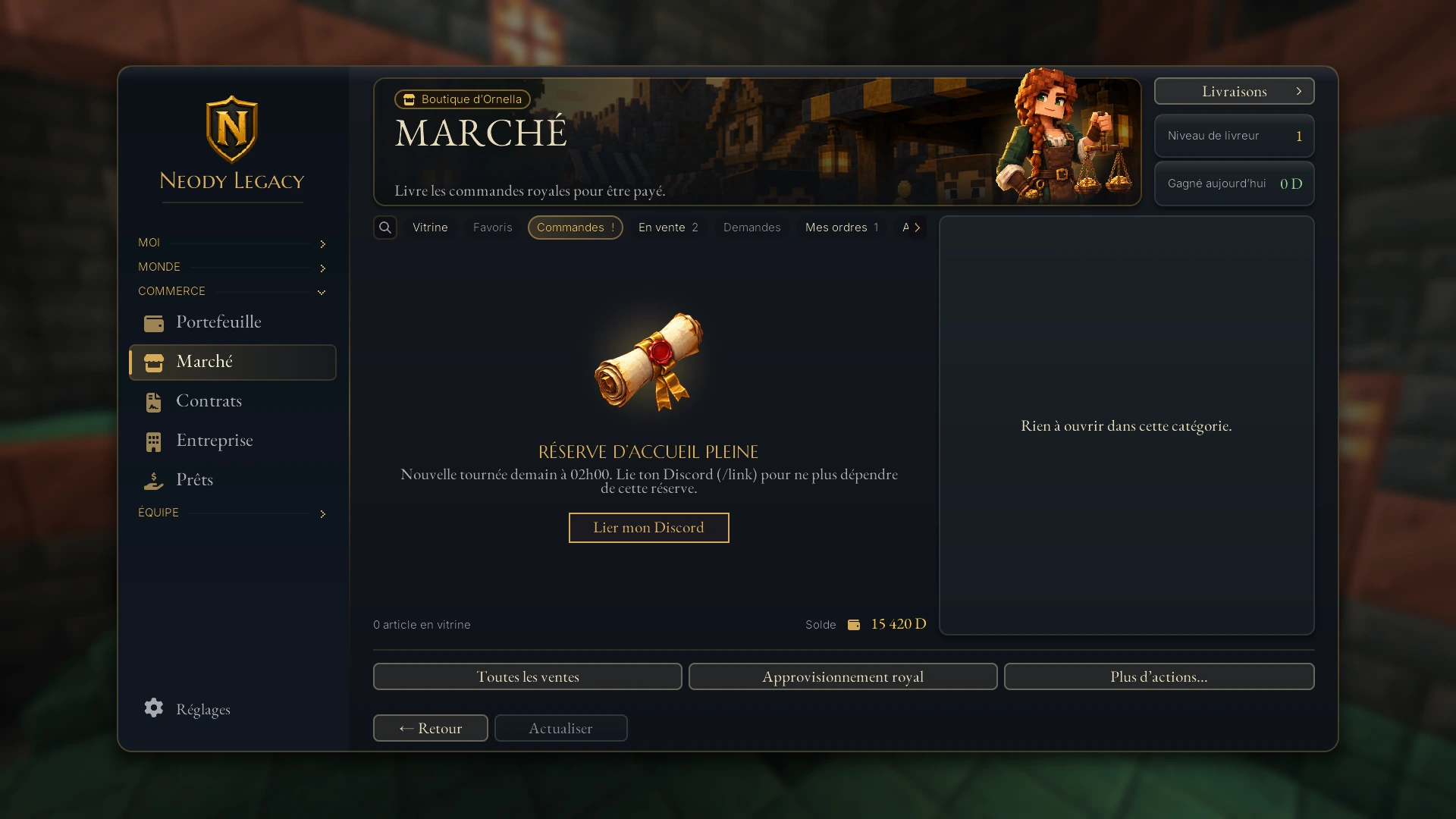
Conditions and specific cases
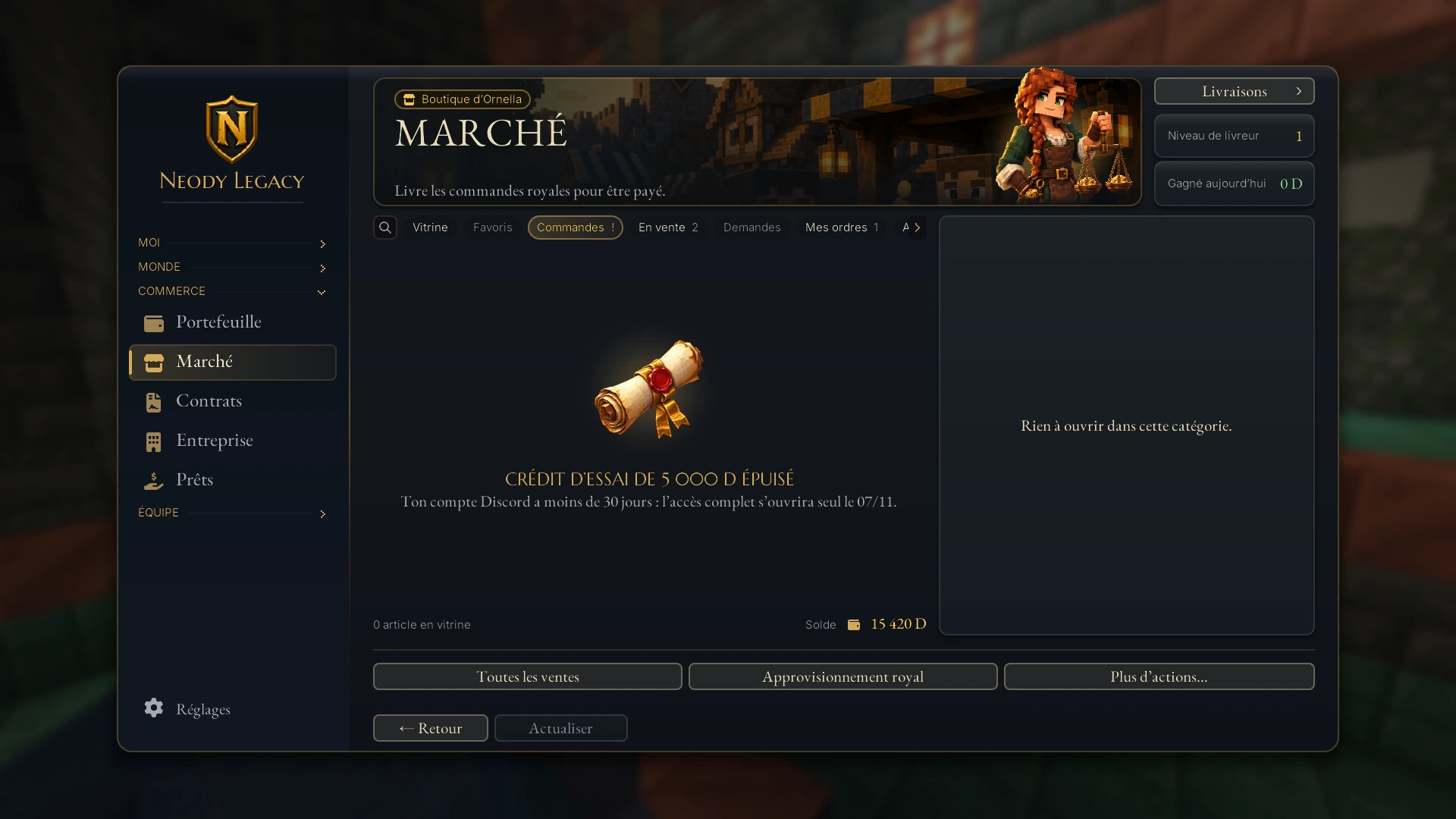
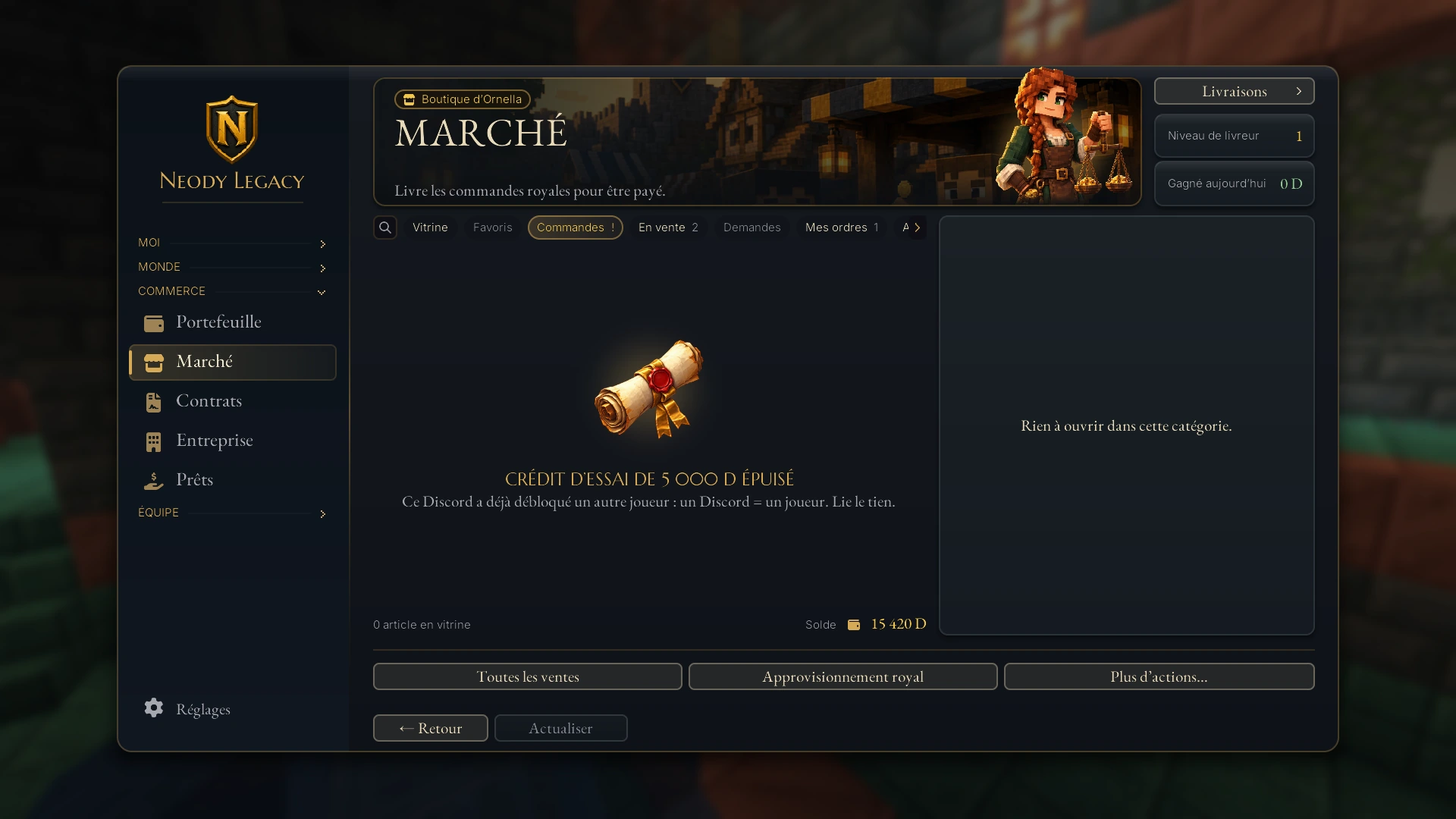
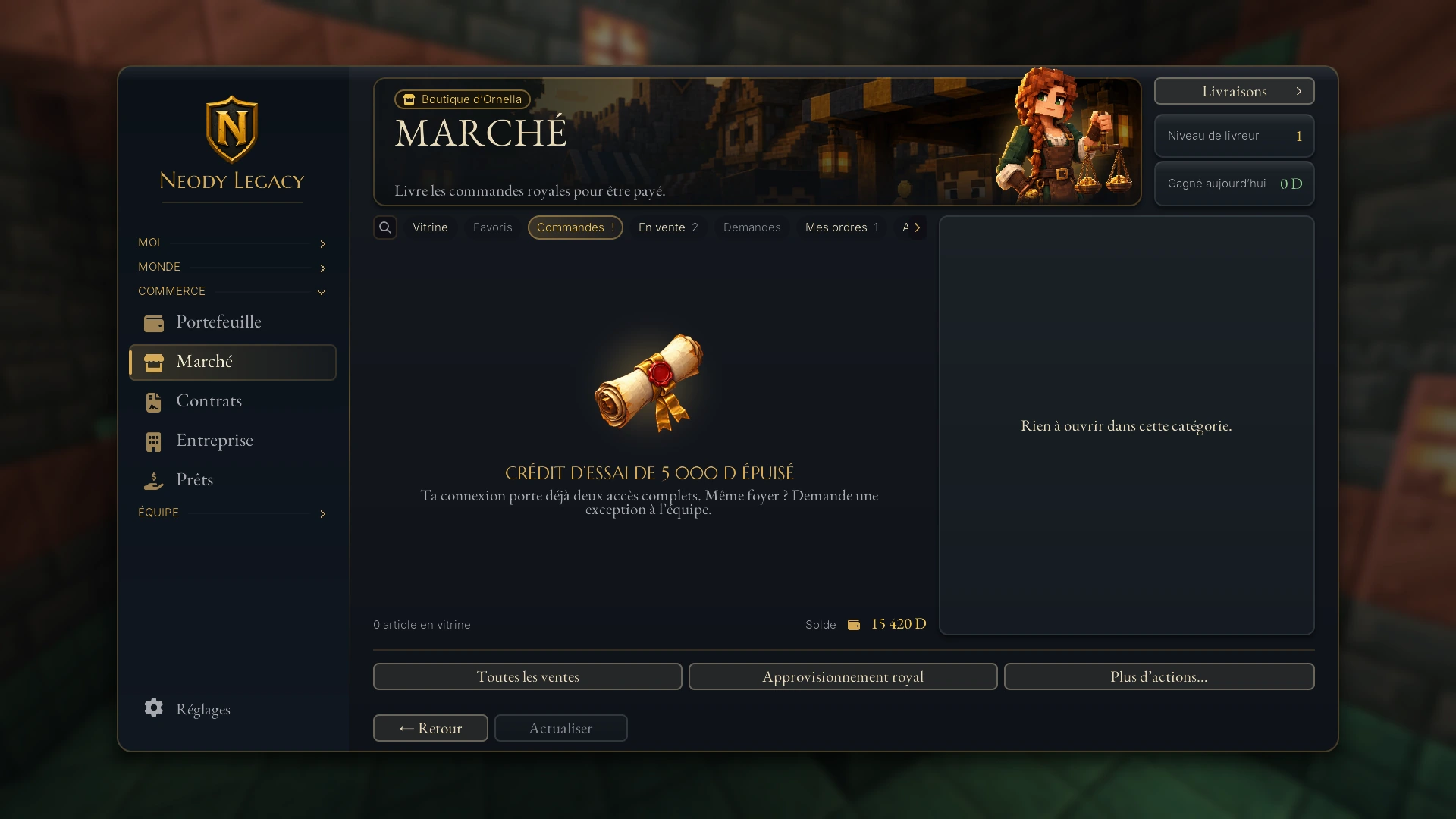
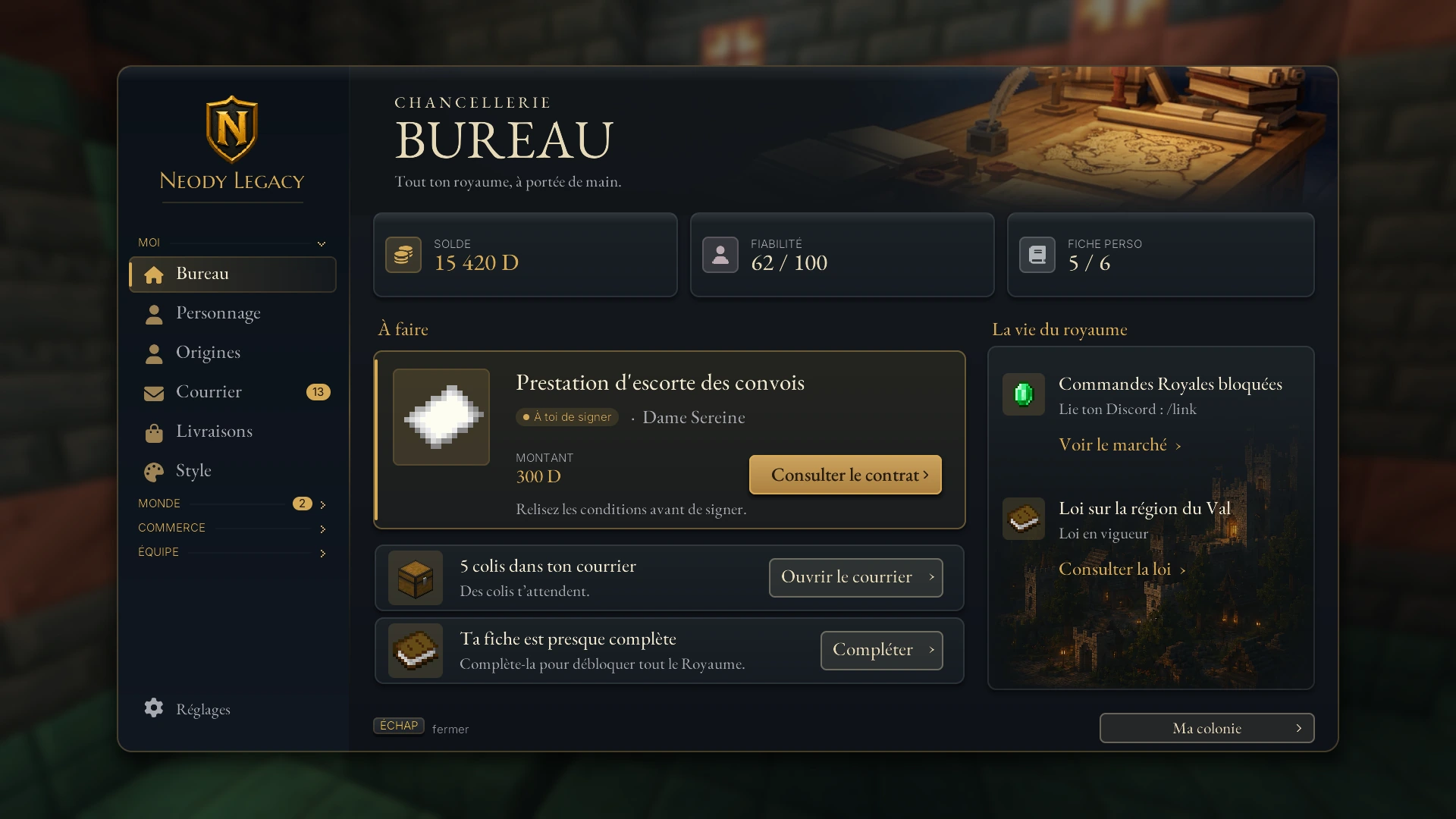
The Bureau (press K) also reminds you of your situation so you always know where you stand:
Need help?
On Discord, the option /link action:aide summarises the procedure: connect in game, type /link, click Copier le jeton, then paste the token into /link code:<jeton>. If you encounter an error not covered here, contact the staff on the Kingdom's Discord.
Linking checklist
I have joined the Kingdom's Discord.
I typed /link in game and clicked [Copier le jeton] (Copy token).
I typed /link code: on Discord with my token within 10 minutes.
I pasted /link confirm … in game.
/link status shows “Discord lié” (Discord linked): my Royal Orders are waiting.
One token, two commands and a confirmation: the Kingdom's seal is in place, and your Royal Orders are ready for you.