Neody
Territories, protection and disputes
Buying 16×16-block plots, paying rent, protecting your colony and resolving disputes with the staff: everything about Neody Legacy's territories.

Contents
Your home, farm and chests: what protects them from inconsiderate neighbours? On Neody Legacy, you can reserve Territoires (Territories) for a daily rent, manage access to your colony's area or rent a prepared plot offered by the Kingdom. Each system has its own rights and deadlines. This guide explains how to tell them apart, check your protection and report a dispute.
- Access
- Press K › Monde › Territoires, or use
/claims - One plot
- 16 × 16 blocks, full height
- Rent
- 12 D per plot per day
- Limits
- 256 plots per player, 64 per purchase
- Unpaid rent
- 3 days' grace, then the plot expires
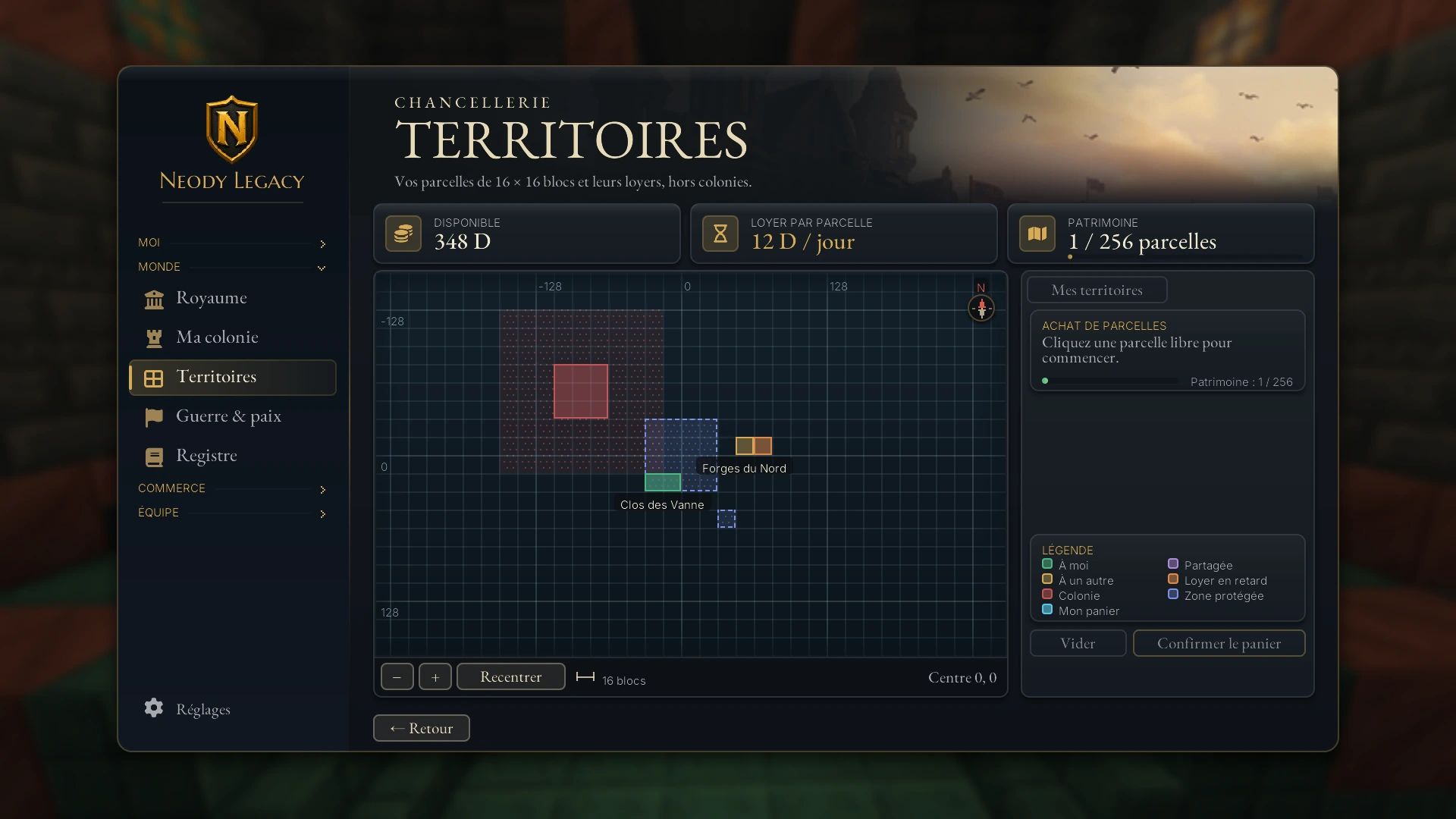
Plots: buying a piece of the Kingdom
A plot is a square of 16 × 16 blocks, or one chunk, covering the whole vertical column from the bottom of the world to the sky. You buy them outside colonies, and each costs 12 D per day. You may own at most 256 and buy up to 64 at once.
Reading the map
Open the menu with K, then Monde › Territoires (or type /claims). Three indicators appear at the top: your available balance, rent per plot and holdings (“1 / 256 parcelles”, plots, for example). The central map has a chunk grid with a 16-block scale, the − and + buttons to zoom, and Recentrer (Recentre). The legend explains the colours:
- À moi (Mine): your plots;
- À un autre (Someone else's): another player's or company's plots;
- Colonie (Colony): a colony's footprint;
- Mon panier (My basket): plots you are selecting;
- Partagée (Shared), Loyer en retard (Overdue rent) and Zone protégée (Protected area); colony surroundings and unclaimed plots complete the picture.
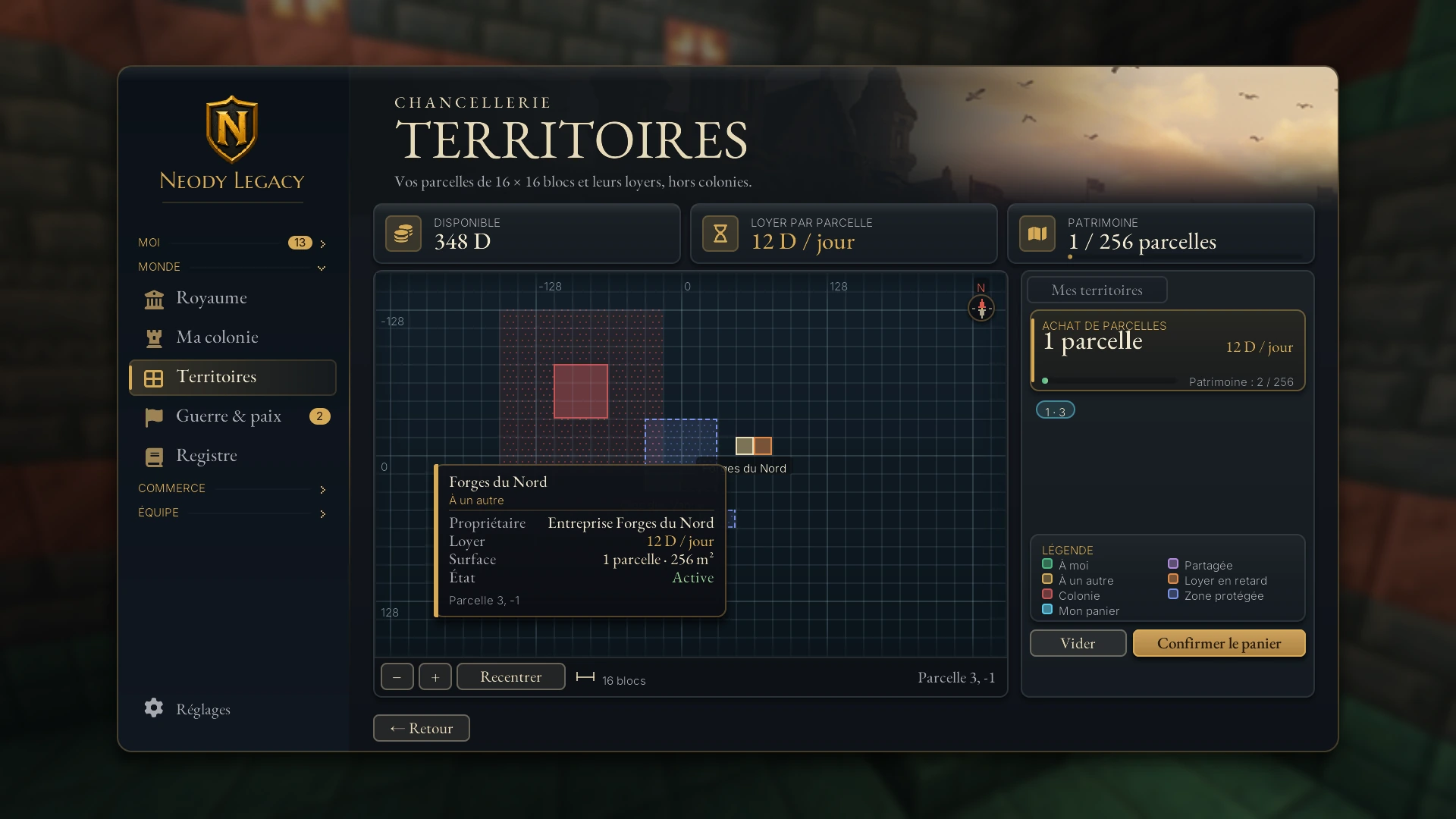
Hover over a plot to see its details: owner, rent, area and status (for example, “Active”).
Buying step by step
1. Fill your basket
Click free plots on the map: they become “Mon panier”, and the right panel shows their number and total daily rent. The basket holds at most 64 plots. Vider (Empty) resets it.
2. Confirm the basket
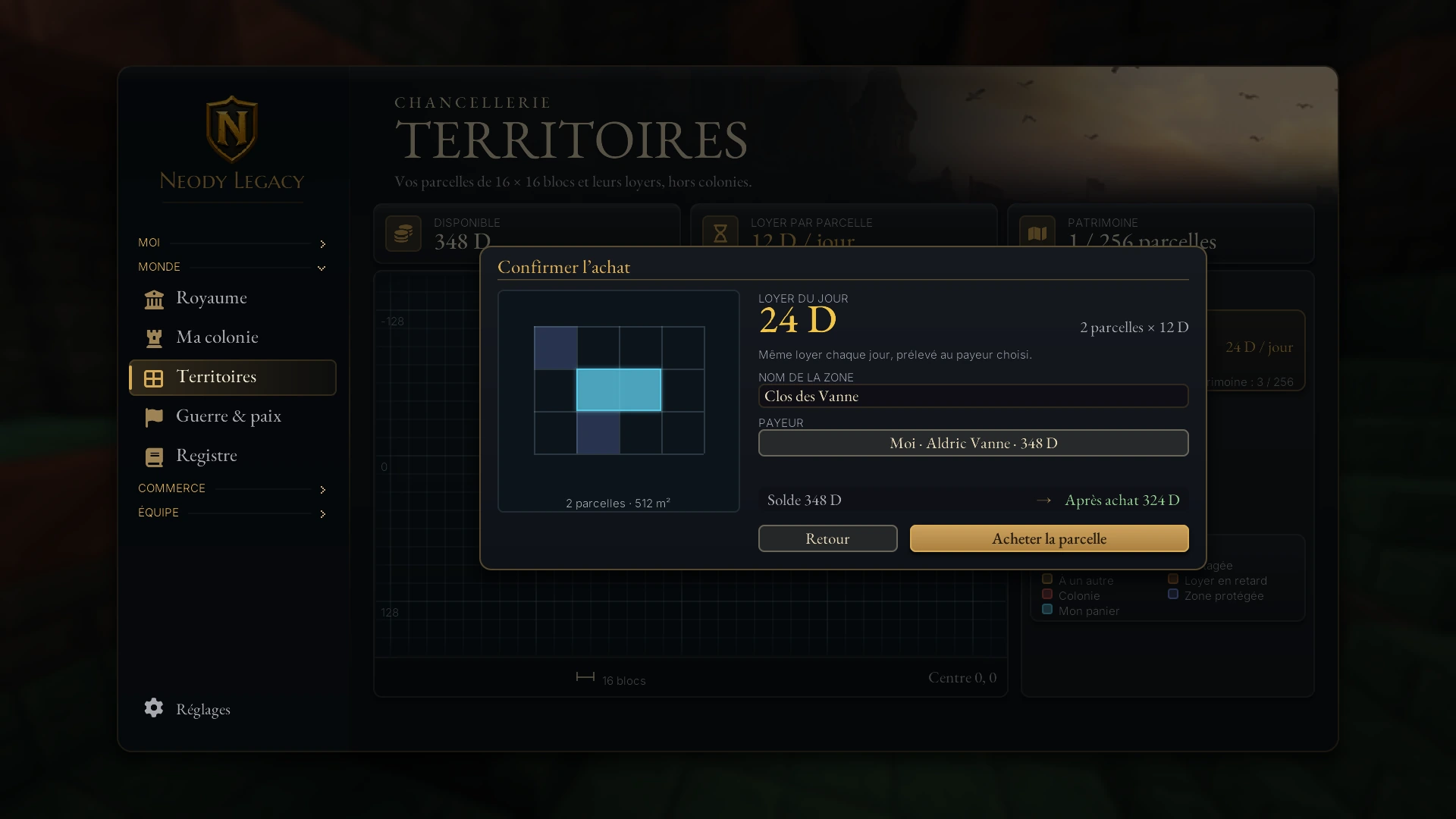
The Confirmer le panier (Confirm basket) button opens “Confirmer l'achat” (Confirm purchase): a preview of your area, today's rent (2 plots × 12 D = 24 D), an optional area name (up to 32 characters), payer and balance before and after purchase.
3. Choose the payer
By default, it is you (“Moi”, Me). You can also charge a company you lead or manage: rent will come from its account.
4. Buy
Click Acheter la parcelle (Buy the plot). The first rent is taken immediately, then the same amount each day from the chosen payer.
Why is my basket refused?
- It mixes dimensions or contains a plot already taken.
- A plot is in a protected area where purchases are forbidden.
- A plot is too close to a colony: you must keep at least 4 plots away from it. These are the “abords de colonie” (colony surroundings) in the legend.
- The basket exceeds 64 plots, or your holdings would exceed 256.
Managing your area: trust, permissions and release
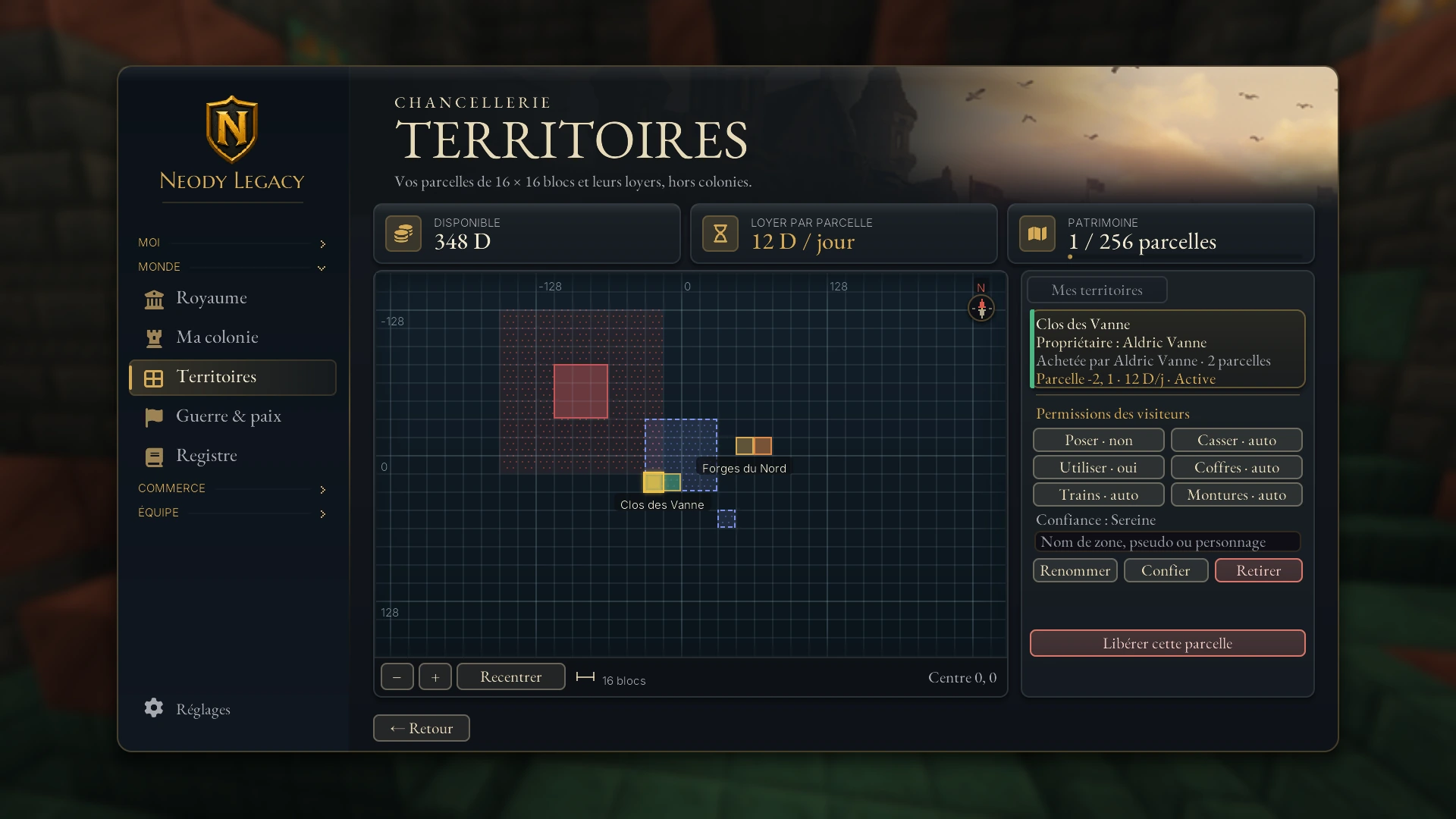
Click one of your plots: the right panel becomes the owner's view. It shows the area name, owner, plots and rent, followed by:
- Renommer (Rename) the area;
- Confier (Trust) the area to a player (name, username or character): they can build and use it like you. You can trust at most 64 players. Retirer (Remove) revokes that trust;
- set visitor permissions: Poser (Place), Casser (Break), Utiliser (Use, right-click), Coffres (Chests), Trains and Montures (Mounts). Each cycles between yes, no and auto (the default rule);
- Libérer cette parcelle (Release this plot): you stop future rent. Today's committed rent is not refunded.
What a plot protects
For any player you have not trusted, a plot prevents by default:
- the placing and breaking of blocks;
- the use of blocks and machinery (right-click), and opening your chests;
- starting fires and causing explosions;
- emptying buckets on your land, using your stations and trains, riding your vehicles and mounts;
- letting monsters damage your land.
Unpaid rent: what happens?
If payment fails, the plot becomes Loyer en attente (Rent pending) (“Loyer en retard”, Overdue rent, on the map), and you receive a notification. Payment is retried every 10 minutes. You have 3 days' grace; after this, the plot expires and loses protection. Simply depositing deniers in the paying account prevents this.
Renting a prepared plot near spawn
Prepared plots offered near spawn use a lease of a chosen length. They are separate from Territoires chunks: the plot's NPC shows its rate and terms before confirmation.
- Speak to the offered plot's NPC and read its status, rate and lease length.
- Choose from the offered durations: 1, 3, 7, 14 or 30 days. Each player may hold only one prepared plot; pending reservations also count.
- Reread the total price and confirm only if you accept the duration. Renewals are limited to 60 days paid in advance or the plot's own cap if lower.
- Renew before the lease ends or prepare to leave. The rate is the one shown in the dialogue: Territoires chunks' 12 D rent does not automatically apply to these plots.
Before placing valuable items there, identify which system applies: prepared plot lease, Territoires chunk or colony. Expiry has different consequences.
Your colony's protection
A colony has its own protected area, independent of plots. Its radius starts at 4 chunks around your Town Hall and may grow to 20 chunks as the colony develops. Normally, outsiders cannot break, place or open containers there, according to the rank your Town Hall assigns them.
Open your Town Hall's Autorisations (Permissions) tab to specify what each rank (including “Gestionnaire”, Manager, and “Hostile”) may do. The Événements (Events) tab's “Événements de permission” (Permission events) section should be your first stop if you suspect an intruder. To found, expand and protect your colony, read Getting started with your colony.
What is unprotected
- Open land. A house, farm or chest outside a colony and outside a purchased plot has no automatic protection.
- An expired plot or a released one.
- A colony facing PvP mode. Under the conditions set for colony combat, players may attack it and destroy buildings.
- Your grave. When you die, a grave appears with your items, and any player can break it and take its contents directly. Return quickly, especially in busy areas.
- You yourself. Plots do not change player combat. You receive protection on connecting: 50 seconds of invulnerability on arrival, after death and each time you change dimension. Fall damage still applies: log out on the ground, never in the air.
- Your citizens and garrison facing a declared war or raid: see War and peace and Barbarian raids.
Disputes: report, prove and let the staff decide
Griefing happens despite everything? Take a breath and follow the process: it protects your credibility and your case.
1. Touch nothing
The scene is evidence. Rebuilding immediately confuses the investigation: document the facts first.
2. Gather evidence
Note coordinates (F3), dimension and approximate time window, then take screenshots. In a colony, open your Town Hall's Événements tab; on a plot, hover details show owner and status.
3. Report to the staff
Go to the official Discord and open a ticket with your evidence. Describe the facts without blind accusations or taking matters into your own hands.
4. The staff investigate
The moderation staff examine your evidence and check what happened.
Restoration is never guaranteed in advance: protecting what matters before anything happens remains your best defence.
Common pitfalls
“I cannot break anything here.” You are on someone else's plot, in a colony or in a protected area. Check the Territoires map legend to see which.
My chest was emptied outside a plot. There is no protection on open land. Report it and move your possessions to a plot or your colony.
My friend cannot build at my place. Use Confier on the plot, or set visitors' “Poser” permission.
My rent is pending. Your paying account is empty. Fund it before the 3 days' grace end.
My purchase is refused near my colony. Move at least 4 plots away from the colony.
Before expanding your land
My account covers several days' rent (12 D × plots × days).
My plots are at least 4 plots from any colony.
Visitor permissions match what I want.
My valuables are in a plot or my colony.
If griefing occurs: I touch nothing, take screenshots and report it on Discord.
To understand the rest of the menu, read The Neody menu.
The Kingdom does not promise a world without wolves: it gives you boundaries to mark, rent to honour and staff to decide when peace breaks down.