Neody
Voice chat, emojis and music: communicating
32-block proximity voice, groups, whispering, realistic acoustics, emojis, private chat, K-menu mail and 11 playable instruments: your communication guide.

Contents
A kingdom is made of voices: one calling for help during a raid, one whispering a tavern secret, one mangling a lute ballad in the market square. Neody Legacy includes full proximity voice chat, realistic acoustics, emojis, chat portraits and real musical instruments. This guide sets up your voice, ears and orchestra, and explains how to write to an absent player through the Neody menu's Courrier (Mail).
- Voice range
- 32 blocks when speaking, 8 blocks when whispering
- Key controls
- mouse button 5 = voice menu ·
G= groups ·M= mute microphone ·N= voice off - Acoustics
- Realistic sound: cave echoes, voices muffled behind walls
- Writing
- Neody menu's Courrier (K): 500-character letters, delivered even after time offline
- Music
- 11 playable instruments, 55 included melodies, drag-and-drop MIDI import
First time: set up your voice in two minutes
- The setup wizard starts automatically on your first login. Choose between Push-to-talk (hold a key to speak) and Activation vocale (Voice activation) (speaking transmits above a threshold).
- Choose your microphone and output in settings (voice menu → Réglages), then use the built-in microphone test to confirm it works before shouting in the tavern.
- Good to know : push-to-talk is already bound to mouse button 4 (rear side button). Change it in Options › Commandes, under “Chat vocal” (Voice chat). To replay the setup wizard, press Ctrl+Alt+V.
Keys and icons
| Key | Action |
|---|---|
| Mouse button 5 | Full voice menu (settings, volumes, group) |
| Mouse button 4 | Push-to-talk (hold to speak) |
G | Group screen |
M | Mute your microphone (you still hear others) |
N | Disable all voice chat (you neither transmit nor hear) |
H | Hide status icons |
| Unassigned | Whisper, settings, recording and individual volumes: assign these yourself |
The icons tell you everything: visible microphone = speaking; crossed-out microphone = M ; crossed-out speaker = N ; “disconnected” icon = voice is not connecting (see troubleshooting). The Adjust Volumes screen adjusts each player's volume individually. Turning down a loud friend without offending them is a diplomatic art.
Groups and whispers
- Groups are enabled :
G→ create a group (name, optional password) or join one. Group members hear each other at any distance : ideal for expeditions and coordinated defence. Useful commands:/voicechat invite <joueur>and/voicechat join <nom>. - Whispering reduces your range to 8 blocks (instead of 32). Assign its key and hold it for tavern confidences. Eight blocks cover a table, not a hall.
- Proximity creates roleplay : a 32-block range covers a market square. Discreet trade negotiations belong somewhere quiet, or in a private group.
The world's acoustics
- Reverberation : sounds echo according to a space's size and materials. A colony mine echoes like a cathedral; a wooden hut sounds muted.
- Occlusion : blocks muffle sounds, including voices . Someone speaking behind a wall sounds as though they are behind a wall.
- Underwater, everything is muffled. In caves, everything sounds larger. These are personal settings: if your base's reverberation tires you, lower it in the sound settings. Everyone adjusts their own.
Text chat: portraits, emojis and privacy
- Chat portraits : each player's skin head appears before their message, with no setup needed. Detailed options cover position and hat depth if desired.
- Emojis : type
:then the start of a name for autocomplete suggestions (:thinking:and hundreds more). An emoji button sits beside the chat box. Everyone using the launcher has emoji support, so everyone sees your emojis. - Chat privacy : Neody disables the message signatures used by modern Minecraft. The indicator at the bottom right of chat shows the status: green = messages cannot be reported to Mojang. On Neody Legacy, this is a deliberate privacy policy: what is said in the Kingdom stays in the Kingdom (the Kingdom's rulesstill apply).
Writing to someone absent: the Neody menu's Courrier
Your voice reaches only 32 blocks, and your friend is not always online. For anything that should await their return, the Neody menu (press K) has its Courrier (Mail), run by the Relais de Lysa: the Kingdom's written channel for messages that do not need an immediate reply.
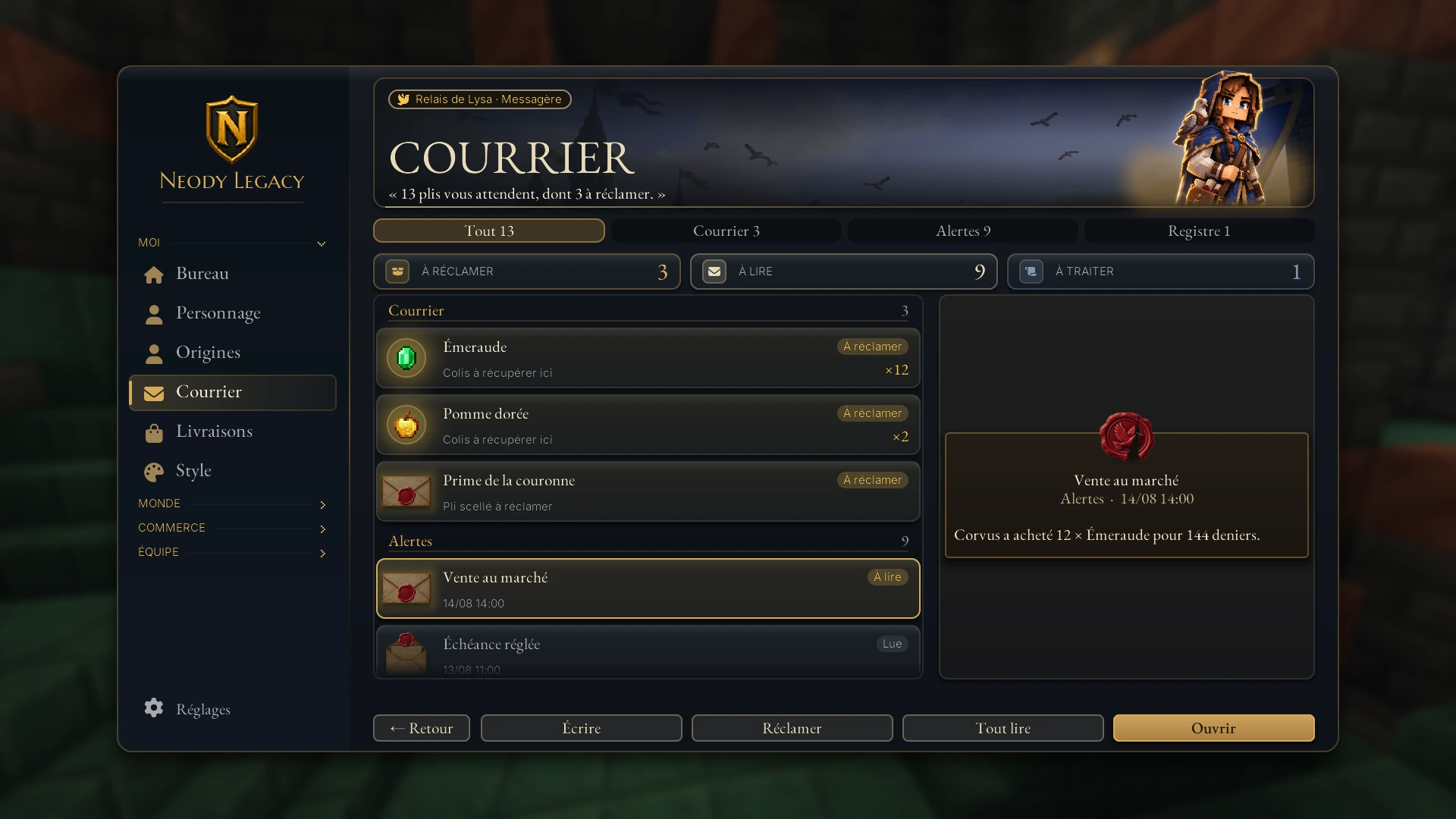
- Read : open K › Courrier. Tabs sort the list (Tout, Courrier, Alertes, Registre: All, Mail, Alerts, Register), while counters show things to claim, read or process. “Tout lire” (Read all) and “Tout réclamer” (Claim all) clear the pile in one click.
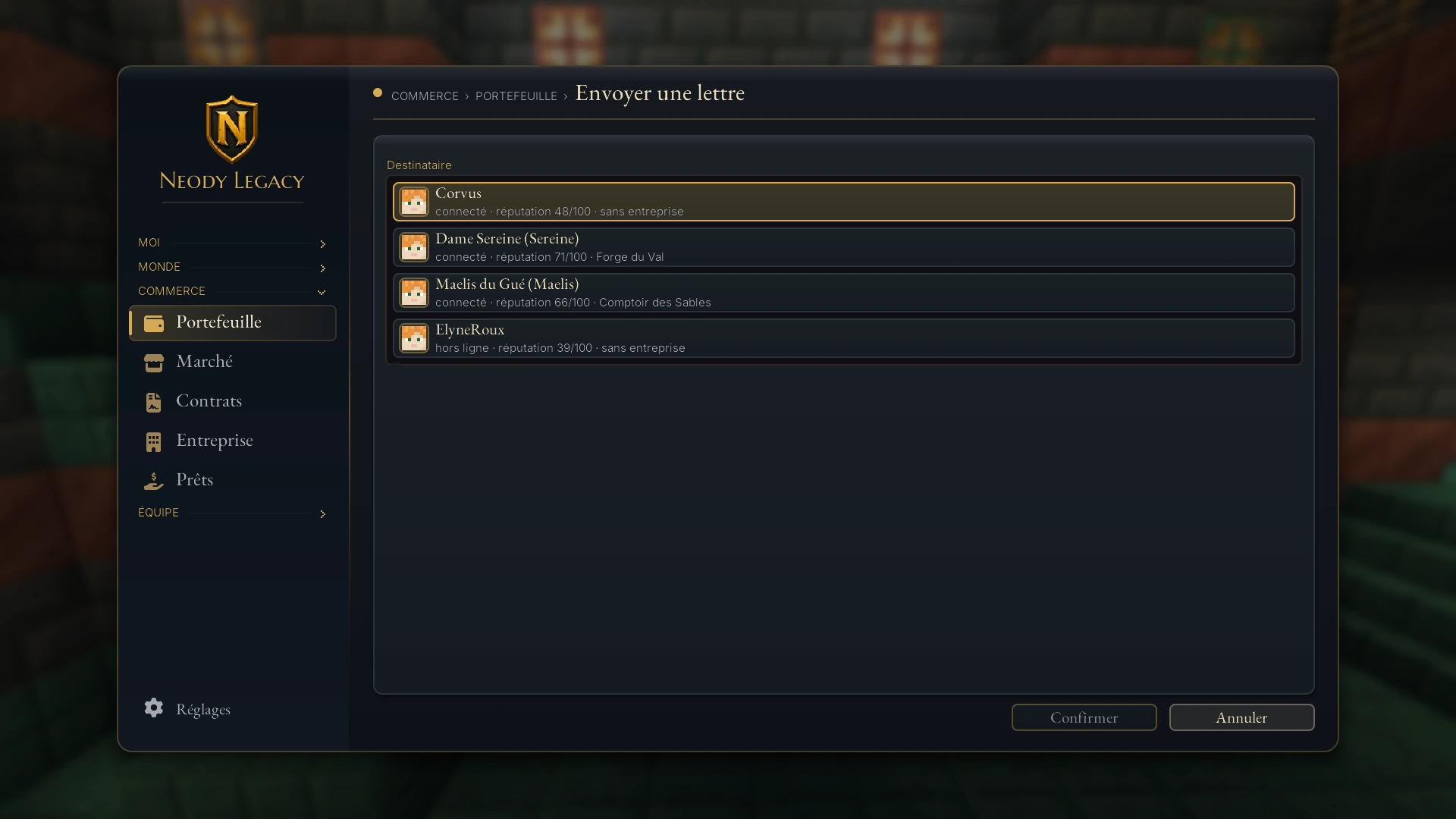
- Write : K › Commerce › Portefeuille › “Envoyer une lettre” (Trade › Wallet › Send a letter). Choose a recipient, write your letter (500 characters maximum) and confirm. It arrives immediately if they are online, otherwise at their next session: the post forgets no one.
- Alerts : denier transactions, updated contracts and Market sales notify you through mail and small on-screen notifications, even when you are not watching chat.
Seeing what others are doing
- Is a player typing ? A typing animation appears above them, frantic if they type quickly.
- Are they in an inventory ? You see them working on a virtual screen, cursor included, without revealing the contents of their inventory.
- AFK for 5 minutes ? They appear asleep, with “Zz” in the player list. No more talking to someone who has gone to make tea; a typing player's silence in voice chat also makes sense.
The Kingdom's orchestra
Eleven playable instruments: bagpipes, didgeridoo, flute, lute, piano, triangle, trumpet, tiny drum, hurdy-gurdy, Ender basses and a handle. Recipes are in the recipe browser.
- Play : hold an instrument and right-click to open the interface with 55 included melodies. Play, pause and choose tracks.
- Import your music : drag a MIDI file into the game window : the melody is uploaded and becomes playable and audible to everyone. Large files transfer gradually: be patient.
- Play live : free play accepts a keyboard and a connected MIDI device, making a live USB piano concert possible.
- The orchestra : several players start the same melody and divide the tracks between them. The colony band only needs volunteers.
- The monsters' music stand : drop an instrument near a skeleton, husk or pillager; it picks it up and plays a random melody. Parrots dance, allays approve. Right-click the musician to retrieve the instrument.
Common mistakes & troubleshooting
| Symptom | Cause | Solution |
|---|---|---|
| “Disconnected” icon / nobody hears me | Voice uses a separate connection: a firewall, router or VPN can block it | Allow Minecraft's outgoing UDP; test without a VPN. The game can work while voice is blocked |
| PTT selected but silent | PTT is bound to mouse button 4 (or your key changed) | Options › Commandes › Chat vocal › check “Push to talk” |
| I cannot hear anyone | N pressed (voice disabled), rather than M | Press N again; M only mutes your microphone |
| Microphone not detected | Wrong device or system permission | Voice menu → Réglages → explicitly choose the microphone; check microphone permissions; restart after connecting it |
| Voices echo too much at home | Your room's reverberation | Lower reverberation in personal sound settings, or furnish the room |
| Emoji shown as plain text | Misspelt name | Use autocomplete or the emoji button |
| Chat indicator does not appear | It updates after your first message | Send a message and hover over the icon for details |
| MIDI import refused | File is not valid MIDI | Check the format; large files take time. Without upload permission, the file is refused (“Tu n'as pas la permission de télécharger des fichiers !”, You do not have permission to upload files!) |
| A skeleton keeps the instrument I gave it | The monster picked it up and plays a melody | Right-click the monster to recover the instrument |
The town crier's FAQ
- How far away can I be heard? 32 blocks with normal speech, 8 when whispering.
- Is voice chat compulsory? No: you are not kicked for lacking voice support, and
Ngives complete radio silence. But a kingdom is better enjoyed with your ears. - Can we talk at unlimited distance? Yes, in a group (
G): that is what it is for, and it is enabled. - Can my written messages be reported to Mojang? Not when the indicator is green: signatures are disabled. Local moderation remains very much active.
- Can I play my own composition? Yes: export it as MIDI, drag it into the game window, and it joins the server's repertoire. Copyright applies just as with paintings : your creations, not someone else's.
- How do we play a trumpet-and-drum duet? Same melody, different tracks, a spoken starting signal: the great hall's acoustics do the rest.
Your voice, properly configured:
- Wizard completed, microphone tested, PTT or voice activation deliberately chosen
- PTT key checked if used (mouse button 4 by default)
MandNdistinguished once and for all- A group created with your expedition companions
- Individual volumes adjusted; your loud friend suspects nothing
- Mail checked, a letter sent to the friend who was away
- A lute in the tavern chest for glorious evenings
The Kingdom was built with pickaxes, but held together by voices. Whisper, sing or blow the bagpipes: someone is listening within 32 blocks.