Neody
Market and Royal Supply: the complete guide
The player Market (orders, adverts, requests and 5.5% tax) and Royal Supply (prices following demand): a complete guide to buying and selling on Neody Legacy.
Contents
In the Kingdom, two stalls face each other. The Market is where players trade their harvests, ingots and discoveries at their own prices. Royal Supply is steward Aubin's depot, where the Crown sells the basic materials your colony needs. This guide teaches you to read the former, use the latter and choose the right stall at the right moment.
- Access
- Press K › Commerce › Marché
- Sections
- Vitrine, Favoris, Commandes, En vente, Demandes, Mes ordres, Annonces
- Market tax
- 5.5%, paid by whoever fulfils an existing order
- Orders
- Last 7 days, maximum 100 open orders per player
- Supply
- Market's “Approvisionnement royal” button: the Crown sells, prices follow demand (+50% per band, capped at ×3)
- Delivery
- Every purchase arrives in Moi › Livraisons
Opening the Market and reading the overview
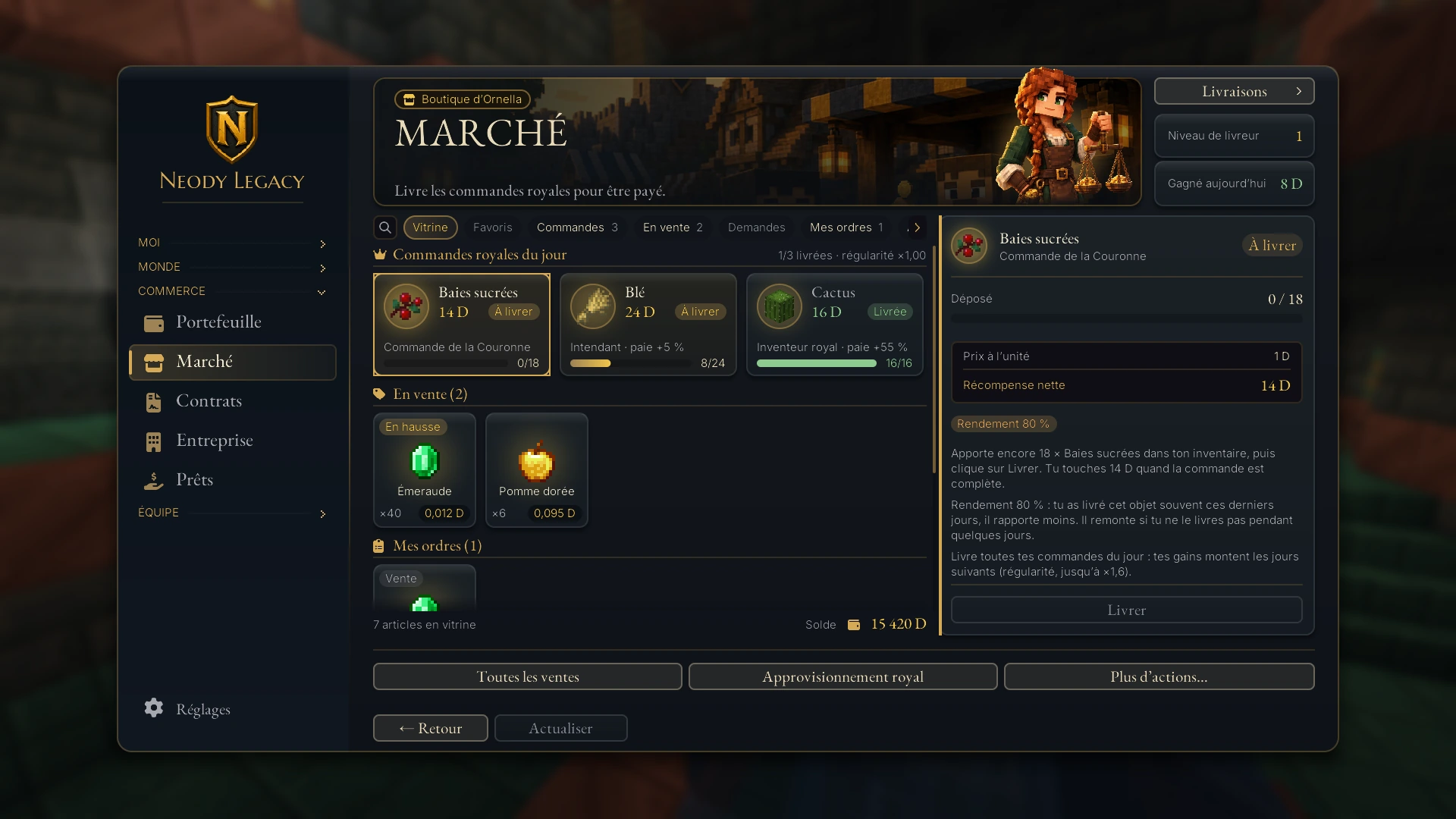
Press K, open Commerce (Trade), then Marché (Market) (“Livrer au Comptoir royal, acheter et vendre”: Deliver to the royal trade counter, buy and sell). There is no merchant to find in the world and no block to place: the Market opens anywhere. The Boutique d'Ornella banner welcomes you: “Approchez! La Couronne achète, le royaume vend.” (Come closer! The Crown buys, the Kingdom sells.)
Read the screen from left to right.
- Top right : the “Livraisons” (Deliveries) button, your Royal Orders “Rang” (Rank) and “Aujourd'hui” (Today) counter.
- Left : the “Rechercher…” (Search…) bar and seven sections, most with counters.
- Centre : item cards for the selected section.
- Right : details of the selected card (quantities, prices and action buttons).
- Bottom : “Toutes les ventes” (All sales, the full catalogue), “Approvisionnement royal” (Royal Supply) and “Plus d'actions…” (More actions…). Your “Solde” (Balance) stays visible.
The seven sections
| Section | What you find there |
|---|---|
| Vitrine (Overview) | The overview: today's orders, some items for sale, your orders and adverts. |
| Favoris (Favourites) | Items you have pinned using their star. |
| Commandes (Orders) | Today's Royal Orders (see the dedicated article). |
| En vente (For sale) | The order book of items offered by players, across several pages. |
| Demandes (Requests) | Buy orders placed by players: you can deliver what they need. |
| Mes ordres (My orders) | Your own active buy and sell orders. |
| Annonces (Adverts) | Player-written offers of goods or services. |
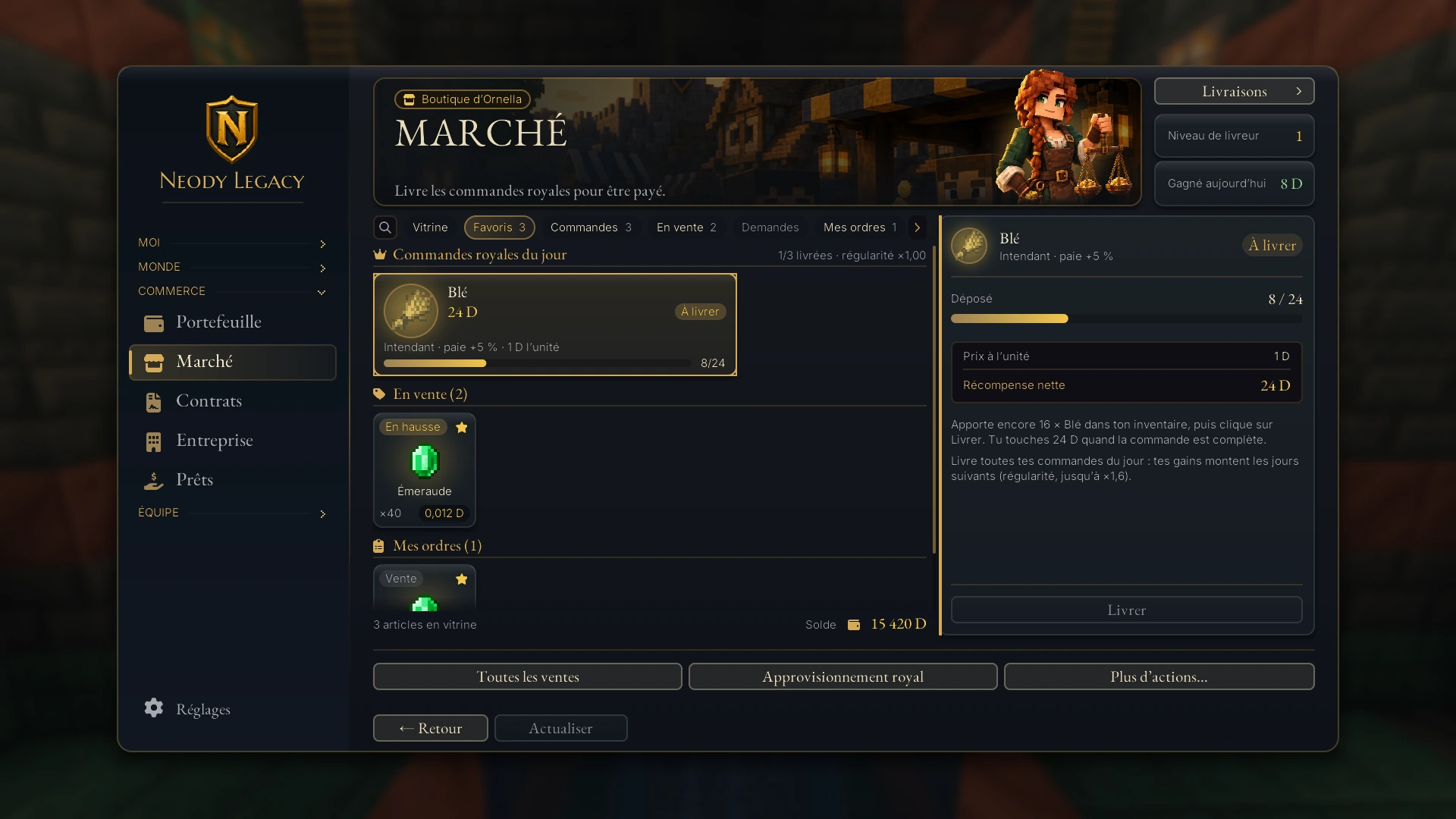
Favoris : click an item's star to pin it; it will appear in that section. This list is a preference on your own computer: it does not follow you between computers.
The “Toutes les ventes” catalogue opens the complete order book (“Toutes les ventes du carnet”), page by page, with “Précédent” (Previous) and “Suivant” (Next). Each card shows available quantity and unit price. “En hausse” (Rising), “En baisse” (Falling) and “Épuisé” (Sold out) badges show price movement at a glance. Hover over a card: its tooltip gives the unit price, available quantity and number of trades in the last 24 hours.
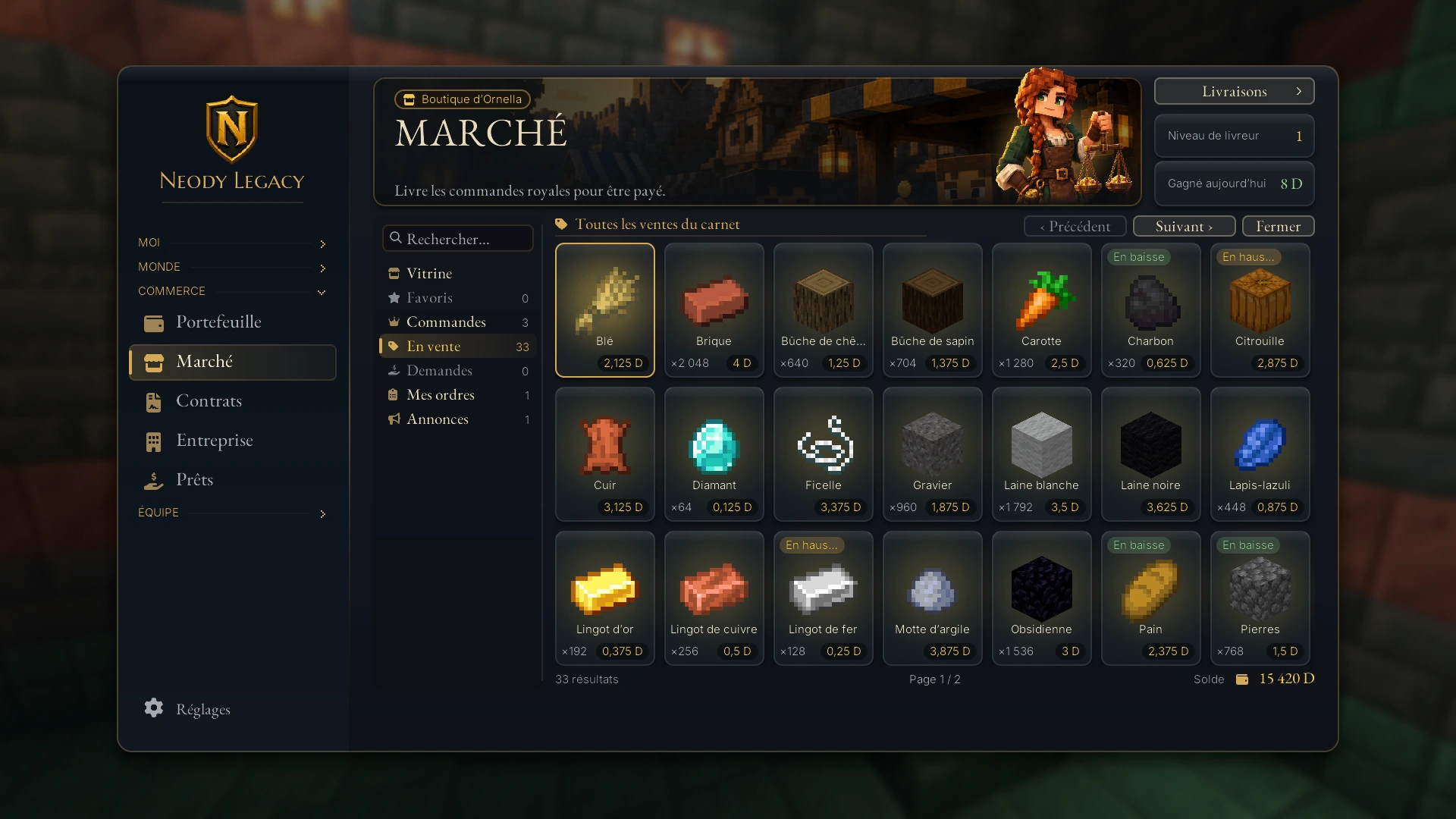
A reading tip: the search bar filters everything you see. Type a few letters to find a commodity in the catalogue without browsing every page.
Buying: immediately or at your own price
Select an item in the overview or catalogue: the right panel (and “Plus d'actions…” button) offers buying actions. There are two ways to buy.
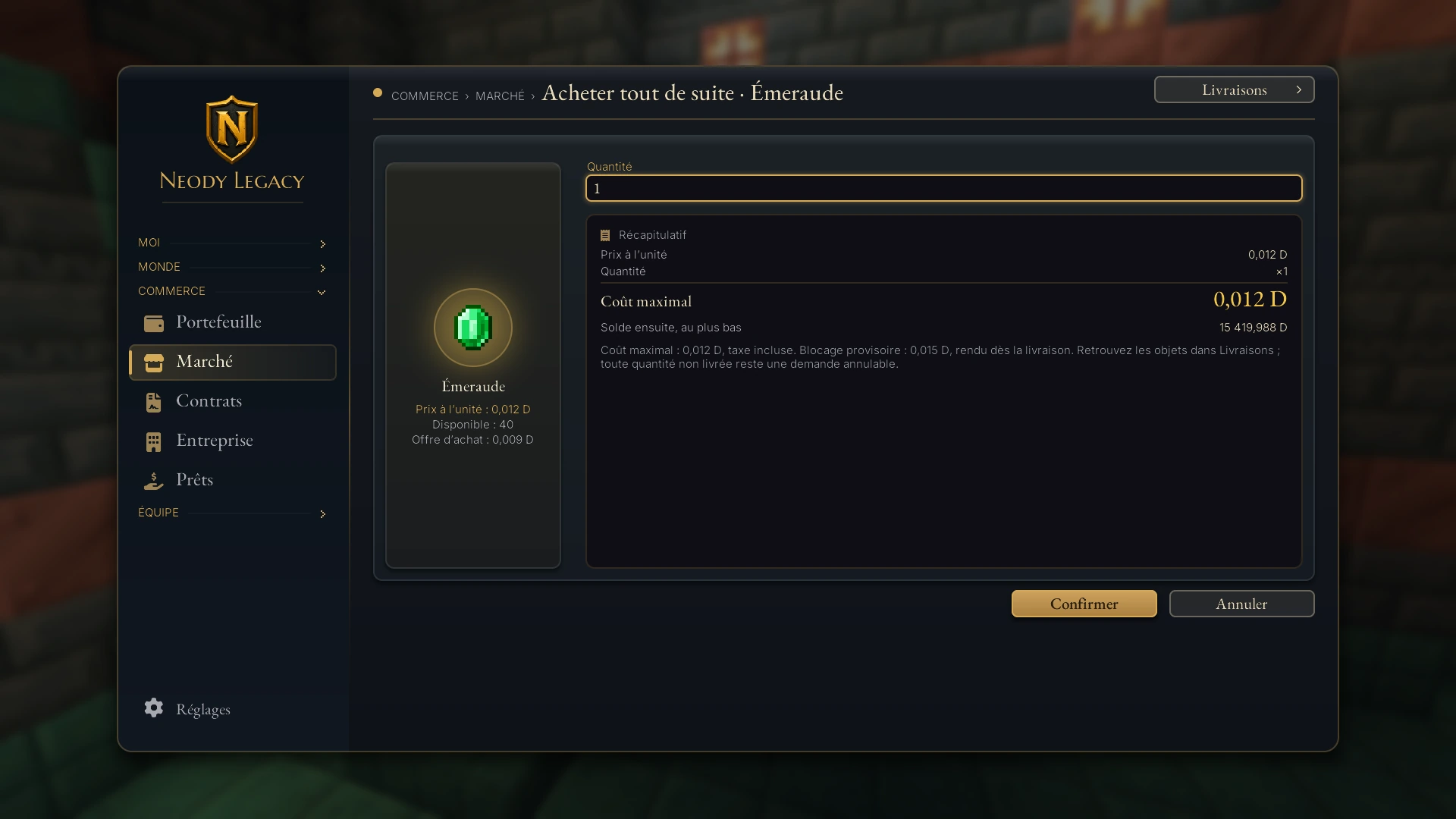
Acheter tout de suite (Buy now). Enter the “Quantité” (Quantity): the game buys from the best existing sell offers. The summary shows unit price, quantity, “Coût maximal” (Maximum cost, including tax) and “Solde ensuite, au plus bas” (Lowest possible balance afterwards).
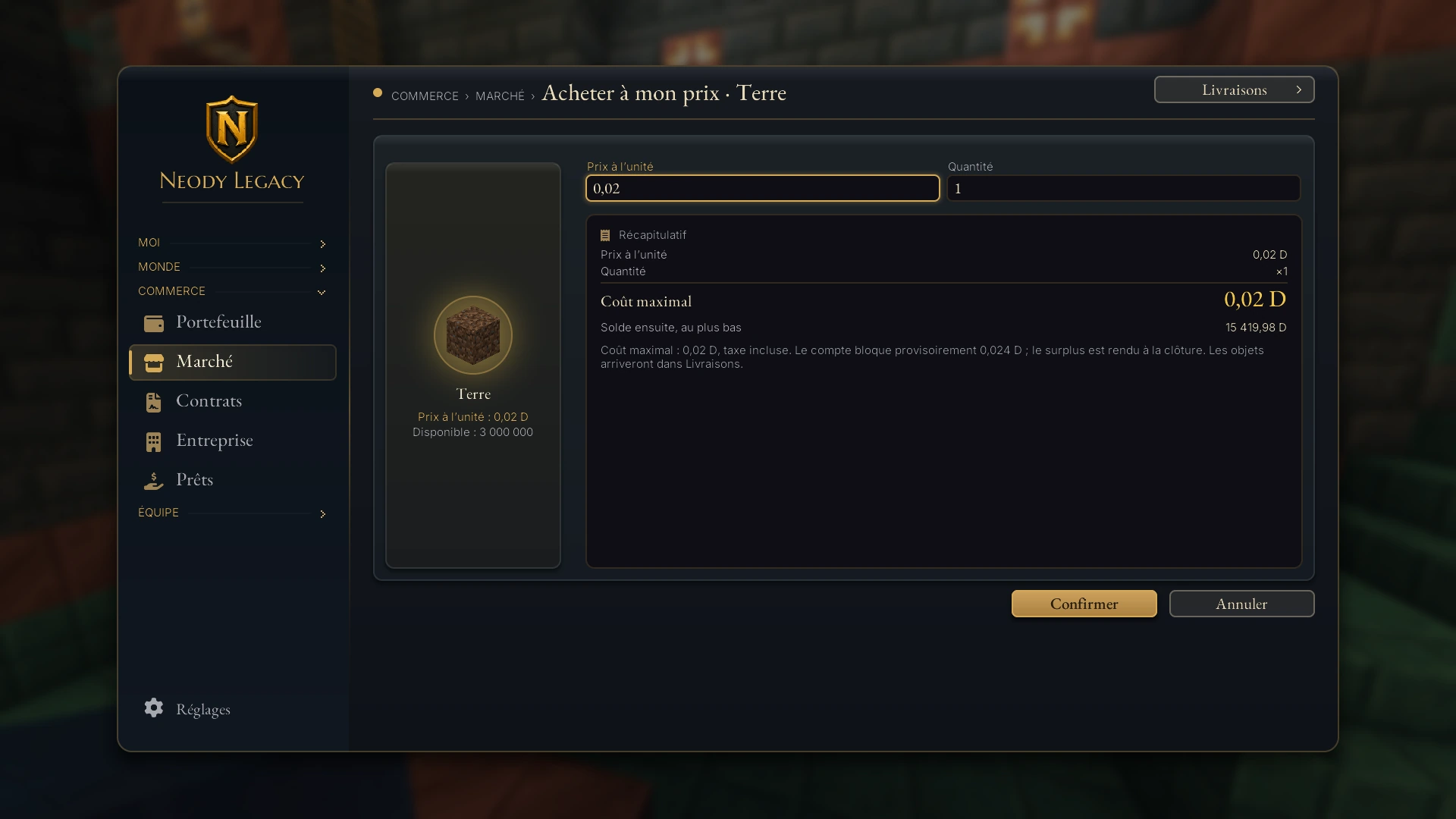
Acheter à mon prix (Buy at my price). Set your price and quantity. Your request joins the order book and fills when a seller accepts your price. You can cancel before it is fulfilled: your deniers are returned.
With “Acheter tout de suite”, the account temporarily reserves an amount slightly above the maximum cost (including tax), returned on delivery. With “Acheter à mon prix”, it also reserves a temporary amount, with the surplus returned when the order closes. Purchased items arrive in Moi › Livraisons, where “Récupérer” (Collect) moves them into your bag. You need not be online when an order fills. If only part of the purchase is delivered, the remainder stays as a request you can cancel.
Selling: list for sale or sell immediately
Here too, two actions mirror the buying options.
1. List for sale
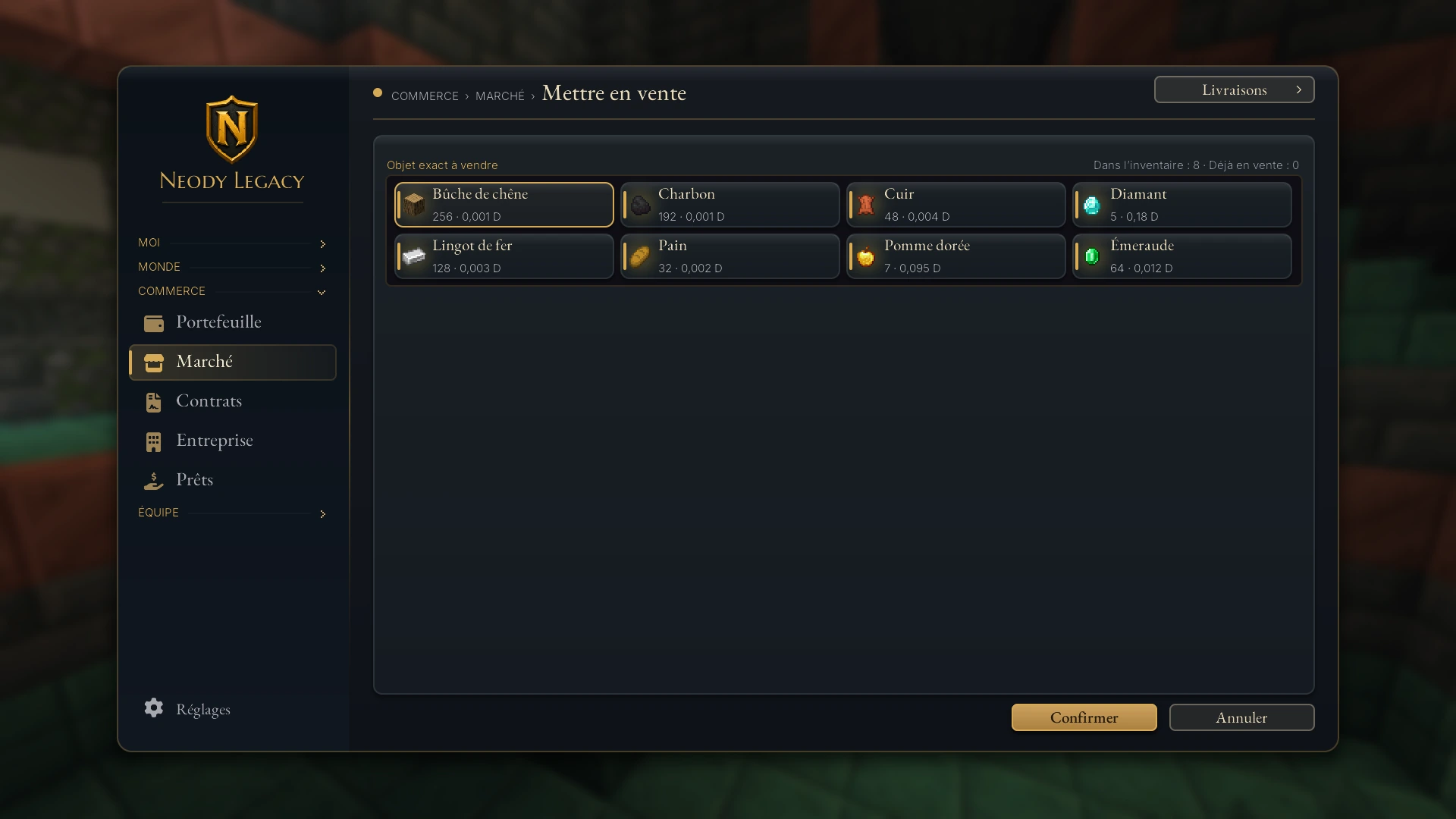
“Mettre en vente” (List for sale): the “Objet exact à vendre” (Exact item to sell) screen lists what you carry, with the reference price. Choose the item by its icon, then enter price and quantity. The confirmed quantity immediately leaves your inventory and stays safely in the sell order. The order lasts 7 days.
2. Sell at your price
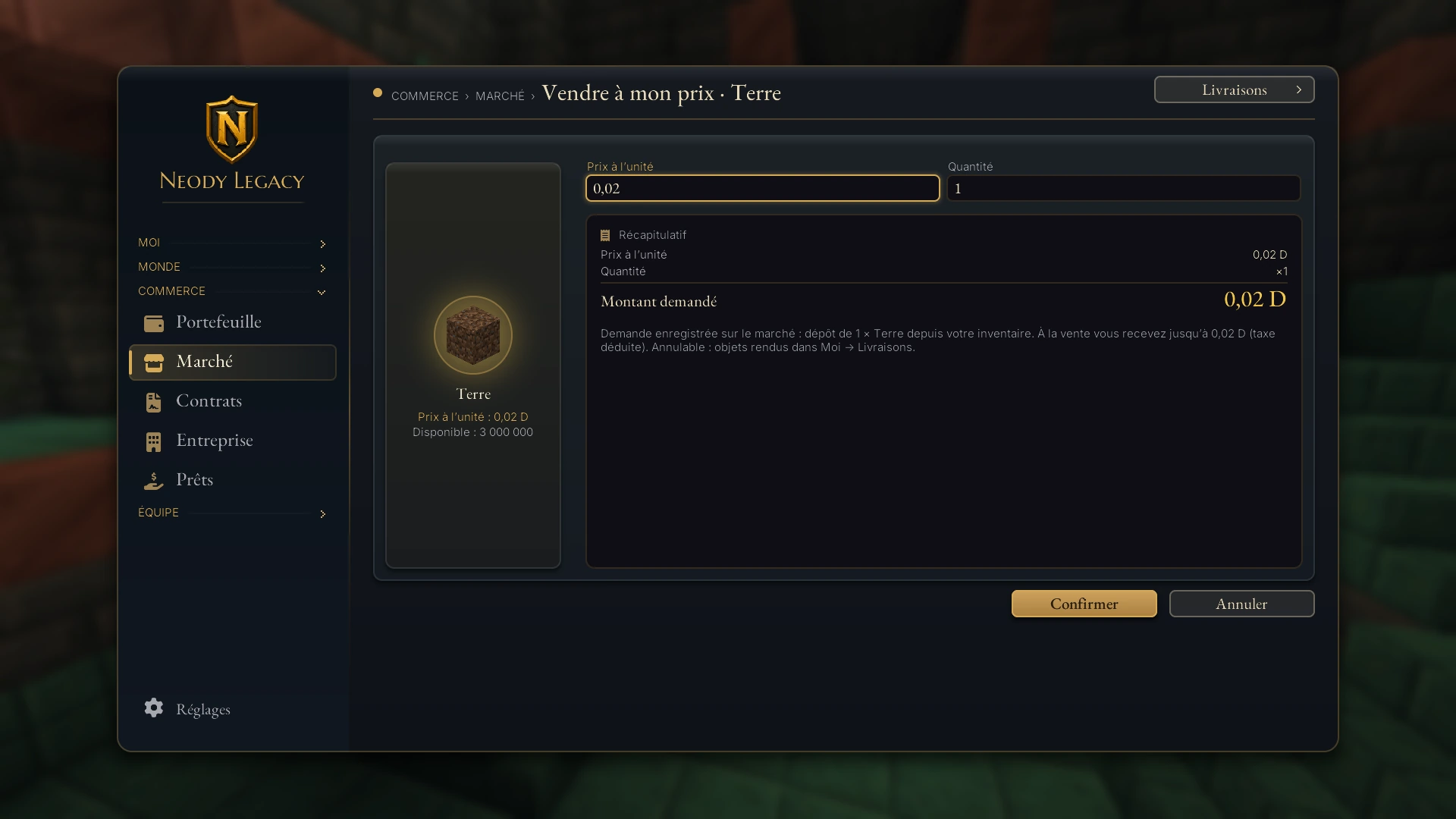
The same principle, with your asking price. The summary states: “À la vente vous recevez jusqu'à X (taxe déduite). Annulable: objets rendus dans Moi → Livraisons.” (On sale, you receive up to X after tax. Cancellable: items returned through Moi → Livraisons.)
3. Sell immediately
You sell to the best open buy order. The summary shows “Vous recevez au moins” (You receive at least) and your balance afterwards. If there is no buy order for this item, the game tells you: “Aucun ordre d'achat ouvert pour cet article” (No open buy order for this item). Place an order at your own price instead.
4. Track your orders
“Mes ordres” lists active orders. You can cancel an order with “Annuler l'ordre” (Cancel order): deniers or items return to you, with items going through Livraisons.
What the order book accepts
- An order holds at most 4,096 items. You may keep 100 orders open at once.
- Partly used tools, renamed items and filled shulker boxes are excluded. Enchanted books are accepted.
- Prices go down to a thousandth of a denier (for example, 0.125 D).
Buy requests and free-form adverts
Requests: publish what you need
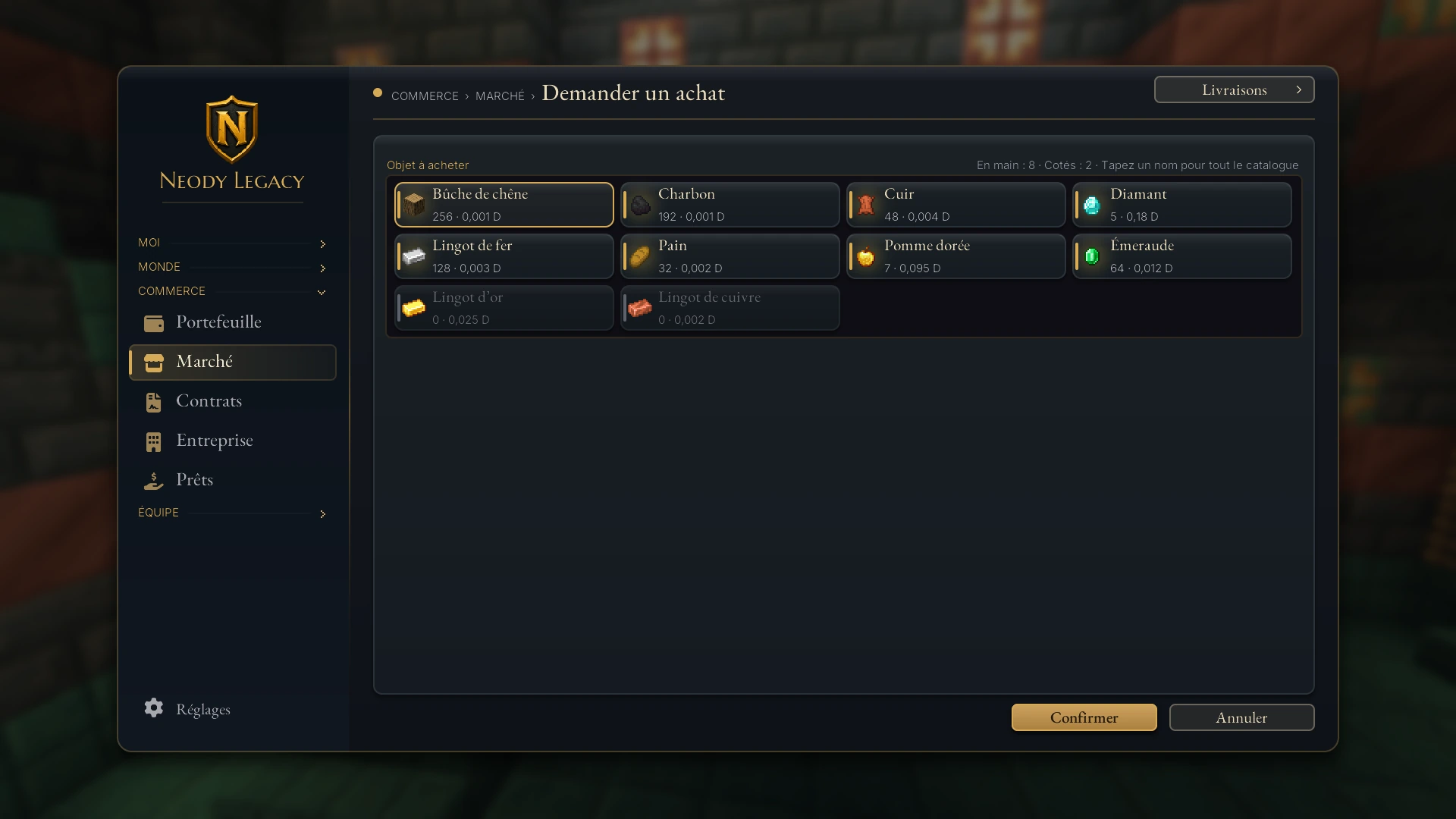
Need an item nobody is selling? Demander un achat (Request a purchase) publishes your request for everyone. Choose an item you carry, one already priced or search its name across the catalogue. The batch's deniers, including fees, remain reserved until delivery or cancellation.
For suppliers, “Demandes” lists what others need. Vendre à cette demande (Sell to this request) delivers straight from your inventory: the quantity leaves immediately in exchange for the requester's deniers, less the Market commission.
Adverts: goods or a service to arrange
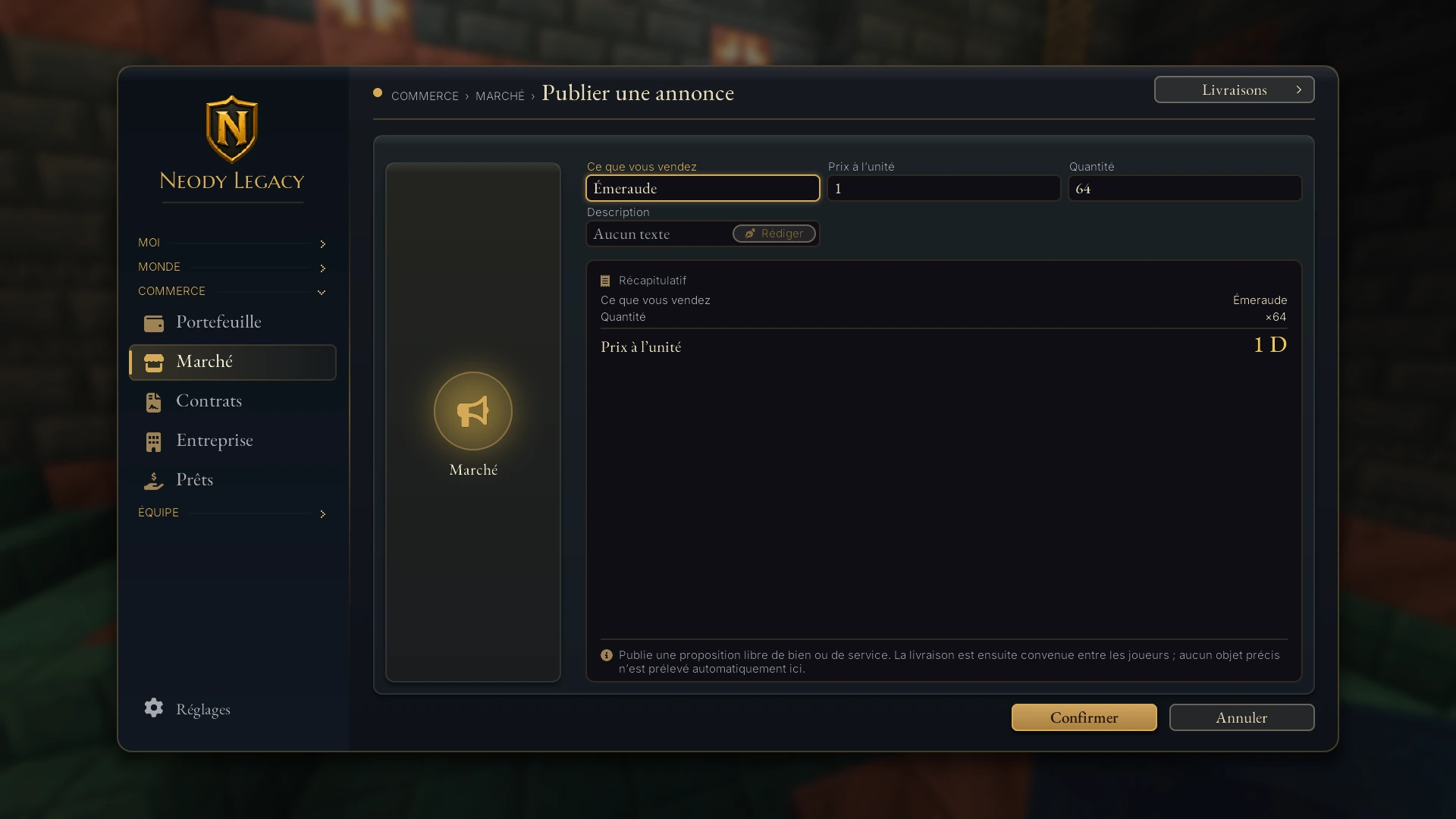
An advert is a free-form offer: a forged batch, building work or transport. Publier une annonce (Publish an advert) asks for “Ce que vous vendez” (What you sell), a unit price, a quantity and an optional written description. No specific item is removed: you arrange handover between yourselves afterwards.
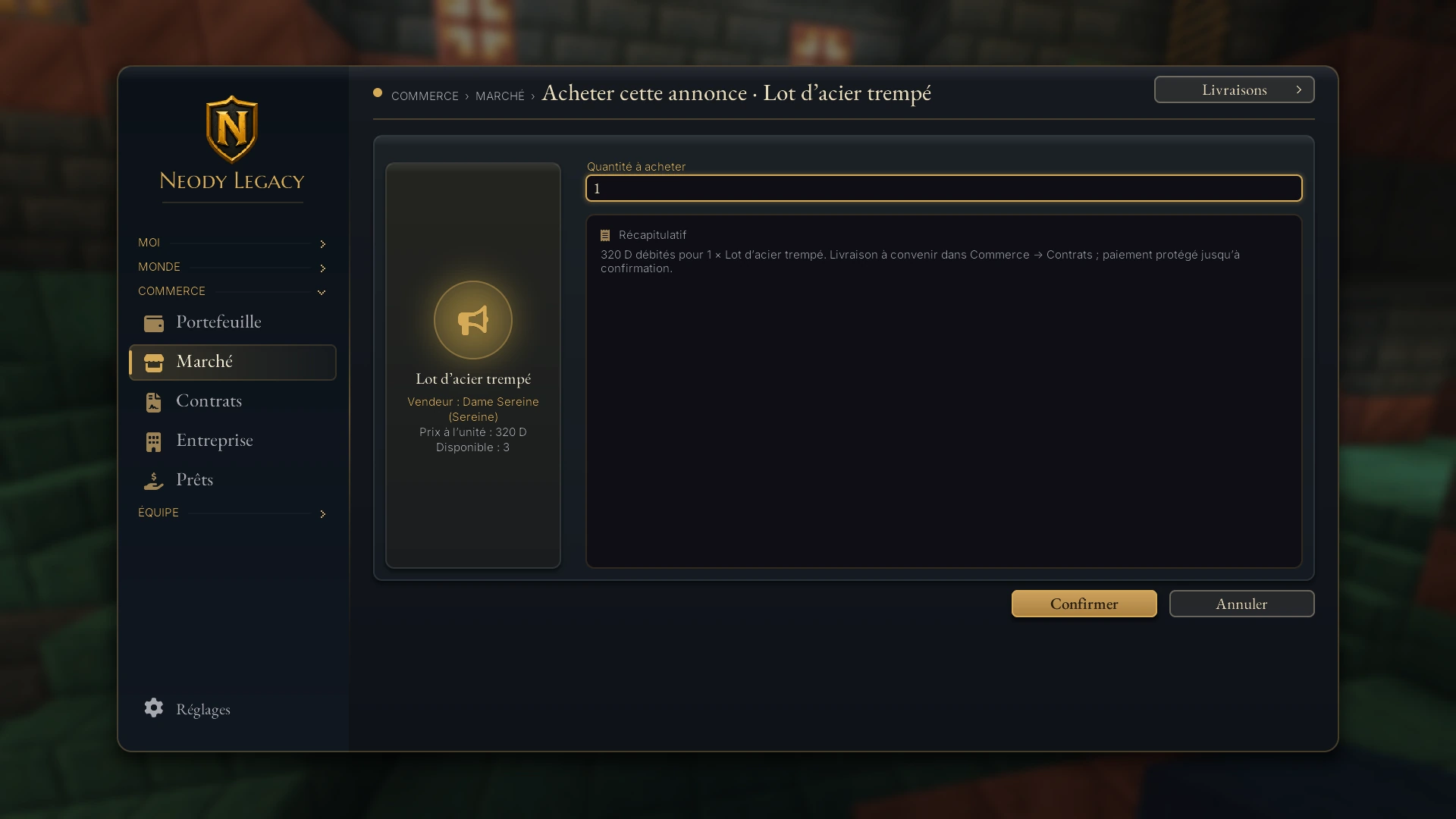
The buyer clicks Acheter cette annonce (Buy this advert). They pay the price plus Market tax. Payment stays protected until delivery is confirmed: “Livraison à convenir dans Commerce › Contrats; paiement protégé jusqu'à confirmation.” (Arrange delivery in Commerce › Contrats; payment protected until confirmation.) The seller declares delivery, the buyer confirms it and the money is released. You cannot buy your own advert, and you may keep 100 open. Retirer mon annonce (Remove my advert) removes it, but contracts already signed remain due.
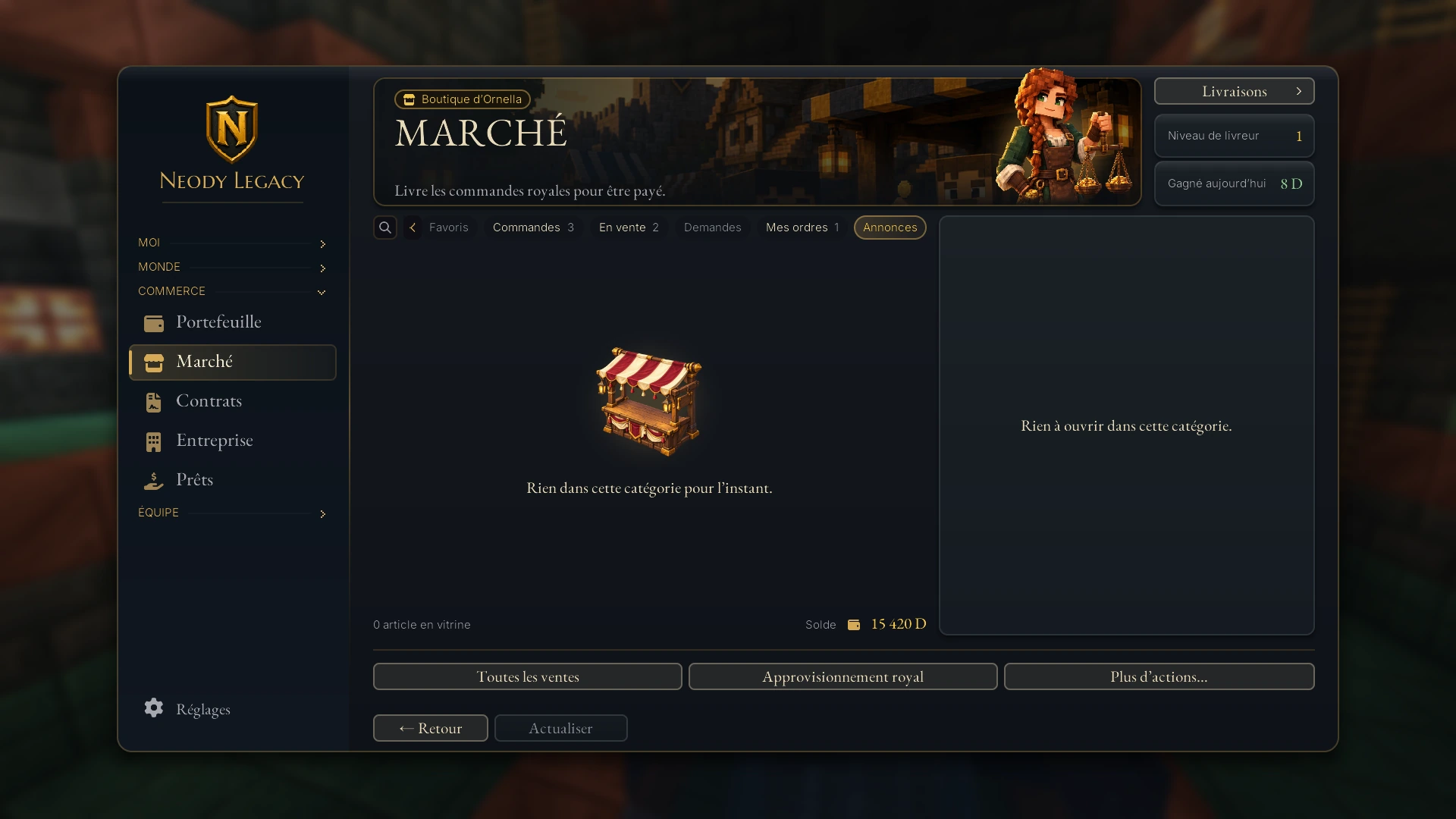
When no advert has been published, the section simply says “Rien dans cette catégorie pour l'instant” (Nothing in this category yet). Yours might be the first.
Market tax: 5.5%, and who pays it
The Market charges a 5.5% tax. The rule is simple: whoever fulfils an existing order pays it; whoever placed the order does not.
| Situation | Who pays tax? | Example for 100 D |
|---|---|---|
| You buy immediately from an existing sell order | You, the incoming buyer | You pay 105.5 D; the seller receives 100 D |
| You sell immediately to an existing buy order | You, the incoming seller | You receive 94.5 D; the buyer pays 100 D |
| You place an order and someone fulfils it | The incoming player | You receive (or pay) exactly your price |
Screenshots use example amounts and do not always itemise tax: its exact amount appears as “Frais de marché” (Market fees) on your receipts. Remember: placing your own order avoids tax; fulfilling one immediately incurs tax in exchange for an instant transaction. With adverts, the buyer pays the price plus tax.
Collecting purchases
Everything supplied by the Market or Royal Supply goes through the Livraisons (Deliveries) tab (also accessible from the button at the Market's top right). Open it, select an entry and click “Récupérer” (Collect): items join your inventory. Items returned from cancelled or expired orders, or unfinished Royal Orders, also appear here. Keep room in your bag.
Royal Supply: the Crown sells to you
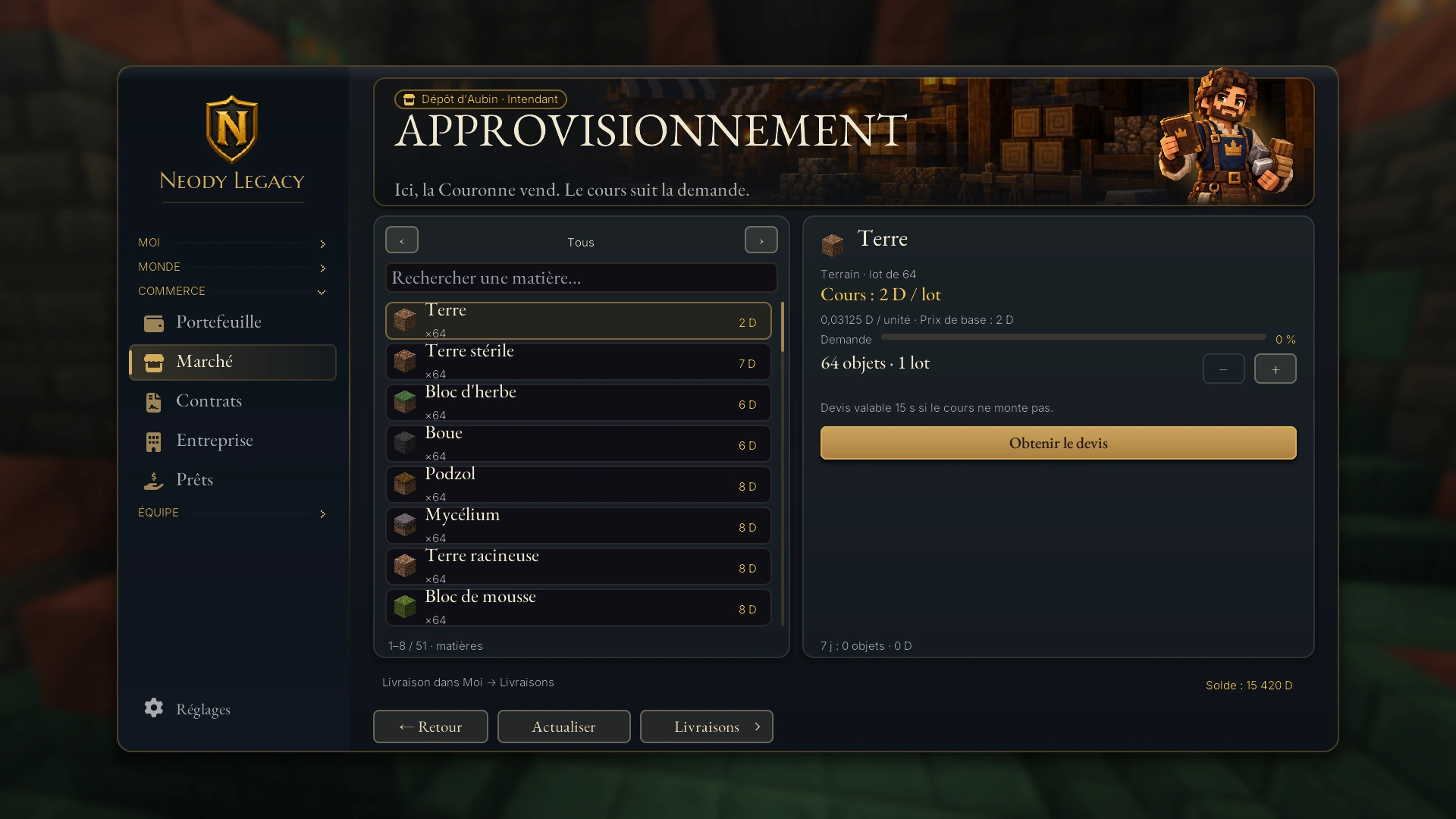
Open it with “Approvisionnement royal” at the Market's bottom. The “Dépôt d'Aubin · Intendant” (Aubin's depot · Steward) screen bears its motto: “Ici, la Couronne vend. Le cours suit la demande.” (Here, the Crown sells. Prices follow demand.)
It is your safety net for basic materials : ground, natural terrain, wood, Nether wood, Nether and End materials, snow and ice, and a few simple ores. Ideal when your colony lacks stone, sand or planks and no player offers any.
1. Choose a material
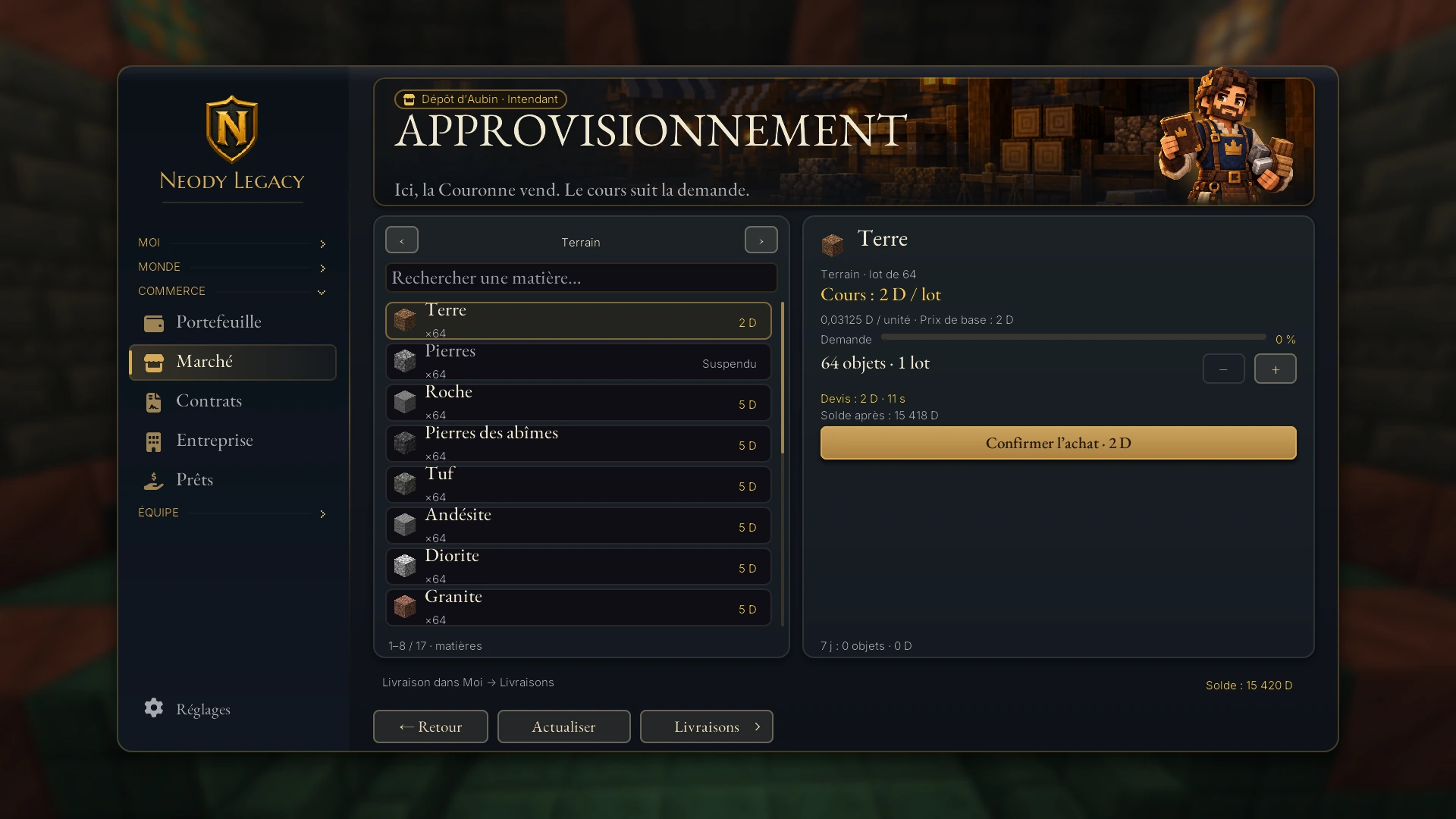
On the left, browse categories (“Tous”, All; “Terrain”, Ground; “Bois”, Wood; “Minerais”, Ores…) with the arrows, or type a name in “Rechercher une matière…” (Search for a material…).
2. Adjust the number of batches
A batch contains at most 64 items. “Ajouter un lot” (Add a batch) and “Retirer un lot” (Remove a batch) adjust quantity: at most 32 batches per purchase.
3. Request a quote
“Obtenir le devis” (Get a quote) fixes a price briefly. The button becomes “Confirmer l'achat” (Confirm purchase), showing the amount and your “Solde après” (Balance afterwards).
4. Confirm quickly
The quote is “valable 15 s si le cours ne monte pas” (valid while the price does not rise). If it expires, request it again. If the price has fallen meanwhile, you pay less.
5. Collect
“Livraison dans Moi → Livraisons” (Delivery to Moi → Livraisons): your items wait there. If your balance is insufficient, the game says “Il manque: X” (Short by: X).
Why prices rise and fall
A material's price follows demand across the Kingdom.
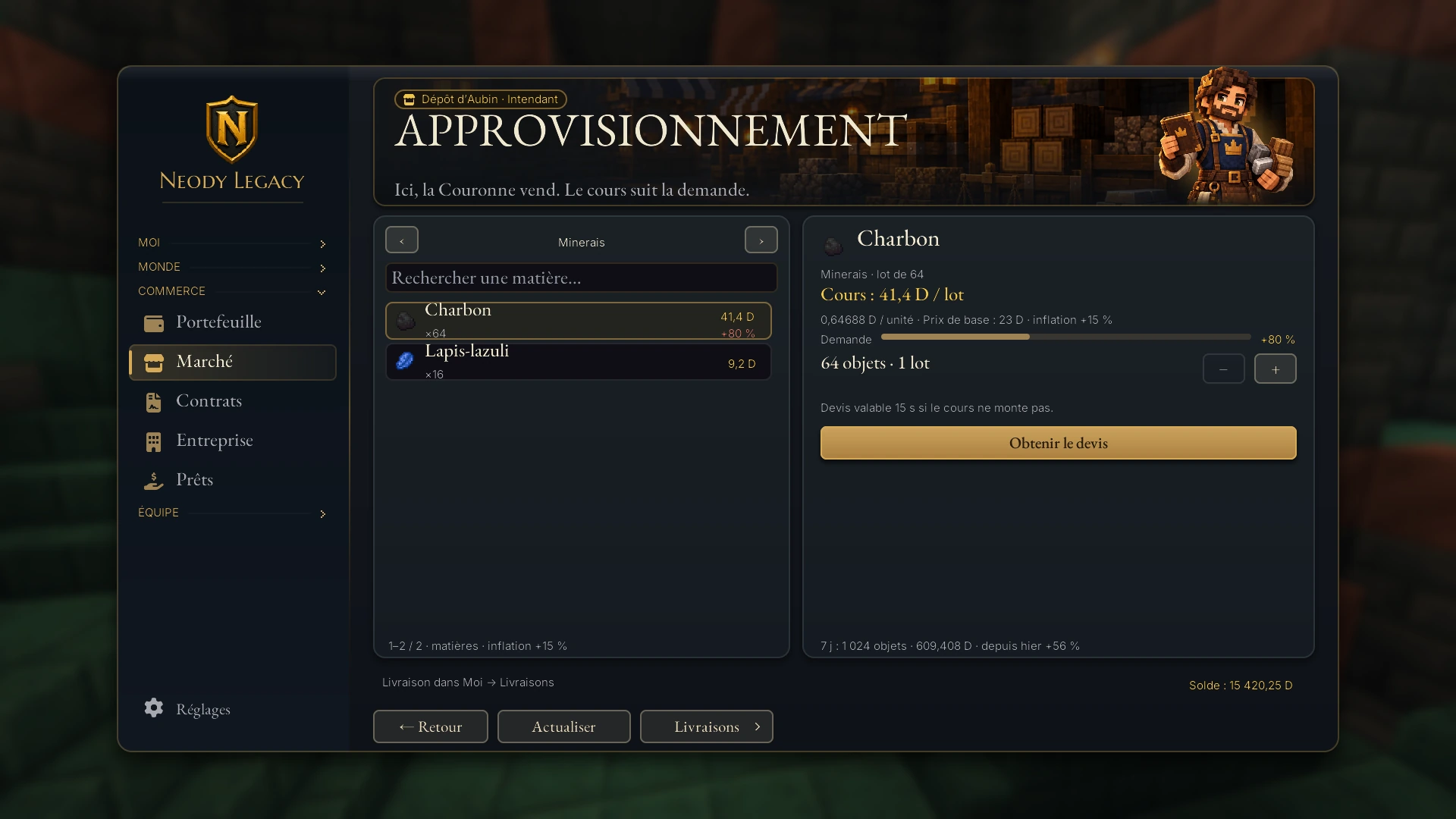
- It rises when people buy. Each band of purchased items adds 50% to the price (the band size appears in the “Demande”, Demand, gauge's tooltip).
- It falls automatically. This surcharge loses half its value every 24 hours (its “half-life”). With no purchases, a surcharge of +80% falls to +40% the next day, then +20%.
- It has a cap. Never more than three times the base price, even if everyone buys the same material.
The card's “Demande” gauge shows the current surcharge rate. The bottom of the screen summarises purchases over the last seven days. Some rough examples: a batch of 64 dirt costs a few deniers, sand a little more, oak logs (a batch of 64) several dozen, and blue ice much more. These prices are guides: the Crown may revise them.
Another important detail: money spent here is destroyed. It goes to no player or treasury. This keeps the Kingdom balanced: Royal Orders create deniers, Royal Supply removes them.
Royal Orders, Market and Royal Supply: who pays whom?
| Royal Orders | Market | Royal Supply | |
|---|---|---|---|
| The Crown's role | It buys items from you | None: players trade with each other | It sells materials to you |
| Your money | You earn new deniers | Deniers change hands | You spend deniers, which disappear |
| Who sets prices | The day's royal price list | Players, order by order | The current price, following demand |
| Frequency | 3 orders per day | Whenever you like | Whenever you like |
| Tax | Progressive royal contribution based on daily gross earnings (see Royal Orders) | 5.5% for whoever fulfils an order | None: you pay the quoted price |
The same item never appears in both the Royal Orders price list and Royal Supply catalogue: the Crown does not buy what it sells. For regular earnings, start with Royal Orders ; to understand accounts, coins and transfers, read Deniers, the currency of the Kingdom.
Pitfalls and good habits
Compare before confirming. The catalogue shows other sellers' prices; a minute comparing can beat an immediate purchase.
Place an order when you have time. No tax for the player placing it, and deniers returned if you cancel.
Empty your deliveries. Purchases wait there; a full bag prevents collection.
Prefer fresh items. Damaged tools, renamed items and filled shulker boxes cannot enter the order book.
Adverts: be clear. Describe what, how much and by when; handover is arranged afterwards, so agree a meeting.
Screenshots are fictional. Prices, names and stock in this guide illustrate the interface: your own screens show the Market's actual state.
Before you start
Open K › Commerce › Marché and explore the seven sections.
Pin your regular items as favourites.
To sell: “Mettre en vente”, price and quantity, lasting 7 days.
Remember the 5.5% tax: paid by whoever fulfils an existing order.
Collect items in Moi › Livraisons.
For an unavailable basic material: “Approvisionnement royal”, quote, confirmation within 15 s.
The Market circulates wealth; Royal Supply keeps it balanced. Learn to use both and your colony will never lack supplies.